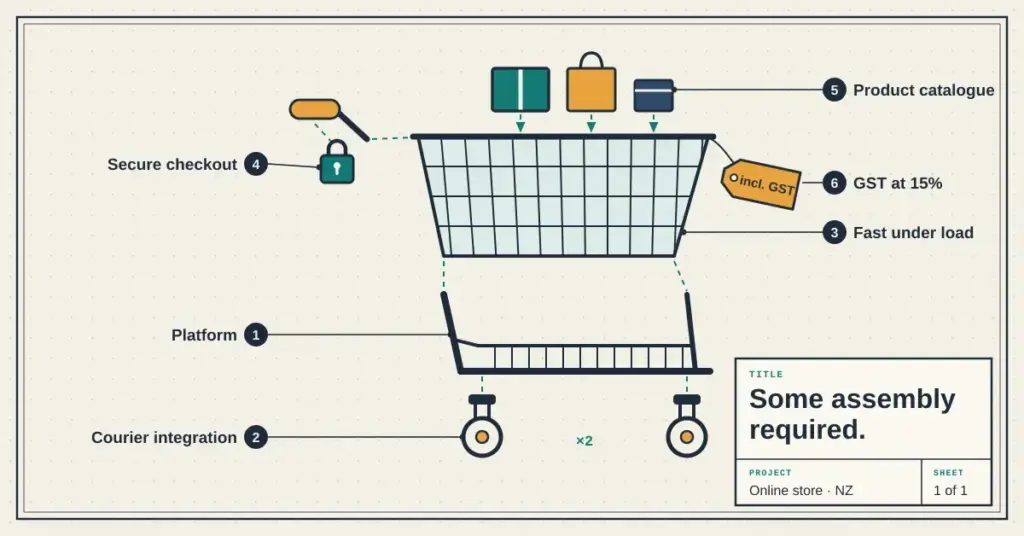
Building an online store is a different job from building a brochure website. A store has to take payments securely, calculate GST, connect to couriers, and stay fast under load — on top of looking good and ranking well. This guide covers the decisions specific to ecommerce development in New Zealand: which platform to build on, what a store needs that an ordinary site doesn’t, and what it realistically costs.
If you’re still at the “do I need a custom build at all?” stage, our guide to choosing a website builder covers the simpler DIY options; this page is about developing a proper store.
Choosing the right platform
The platform is the foundational decision — it shapes how much you can customise, who handles maintenance, and what your running costs look like.
Choosing an online-store platform
The platform sets your flexibility, ownership and running costs.
| Platform | Best for | Trade-off |
|---|---|---|
| WooCommerce (WordPress) | Full control & ownership | You manage hosting, updates, security |
| Shopify | Fast launch, hosted & managed | Monthly fee; less control; platform lock-in |
| Wix / Squarespace / Square | Small catalogues, simple stores | Limited customisation; tied to the builder |
| Enterprise / custom | High volume, complex logistics | Much higher cost and build time |
For most New Zealand small-to-medium retailers, the real choice is WooCommerce versus Shopify. WooCommerce is a plugin for WordPress, so it gives you full ownership and deep customisation — you can shape the checkout, the product logic and the design however you like — but you’re responsible for hosting, updates and security. Shopify is a hosted, all-in-one system that handles the technical side for you and gets you live quickly, at the cost of a monthly fee, less control, and being tied to Shopify’s ecosystem. If your store is small and simple, a hosted builder like Squarespace or Square Online may be enough — the latter is worth a look if you already sell in person with Square POS. Large, high-volume operations with complex logistics move into enterprise or fully custom territory, with the cost and timeline that implies.
The trade-off underneath all of it is ownership versus convenience: WooCommerce is yours to move and modify; the hosted platforms do more for you but hold more of the reins.
What an online store needs beyond a normal site
This is where ecommerce development gets its added complexity. A store carries a set of moving parts a brochure site never touches.
What an online store tends to cost in NZ
Indicative build ranges (plus GST) — actual quotes depend on design, catalogue size and integrations.
| Store type | Indicative build |
|---|---|
| Standard store (WooCommerce/Shopify) | ~NZ$5,000 – $20,000 |
| Complex / high-volume / custom | NZ$20,000 – $50,000+ |
| Ongoing (hosting, care, gateway fees) | Monthly hosting + a per-transaction payment fee |
Budget for SEO and content too — a technically sound store still needs to be found.
Two of these deserve emphasis for the NZ market. Payments: choose a gateway that handles cards securely and suits local shoppers — Stripe, Windcave, PayPal and Buy Now Pay Later options are all common — and make sure it’s PCI-compliant so card data is handled by the gateway, never stored on your own server. Shipping: NZ’s geography makes courier integration genuinely valuable, so the checkout can show real rates, apply rural surcharges correctly, and give customers tracking — cutting down the “where’s my order?” emails that swamp small teams. Click and collect is increasingly expected if you also have a physical storefront.
What it costs
Ecommerce builds cost more than brochure sites because of everything above — the payment, tax, shipping and security layers all take work.
What a store needs that a brochure site doesn’t
- Payments: a gateway that suits NZ shoppers — commonly Stripe, Windcave, PayPal or a Buy Now Pay Later option.
- GST: tax settings configured to apply 15% GST on domestic orders.
- Shipping: courier integration (e.g. NZ Post, Aramex) for real rates, rural surcharges, tracking — plus click & collect if you have a storefront.
- Security & compliance: SSL, a PCI-compliant gateway so card data never touches your server, and Privacy Act 2020 obligations for customer data.
- Checkout & catalogue: a cart, product search/filtering, and a fast, mobile-friendly checkout.
Beyond the build, budget for the ongoing side: hosting, maintenance or a “site care” plan to keep the platform and plugins patched, and the per-transaction fees your payment gateway charges. It’s also worth setting aside budget for SEO and content — a technically flawless store still fails if shoppers can’t find it. If you’re hiring this out, our guide to what website work costs and how to hire well covers vetting a developer and locking down scope before you sign.
Speed, hosting and conversions
For a store, speed isn’t a nice-to-have — it’s a conversion factor. Slow checkouts lose sales, and site speed is a Google ranking signal. Hosting the store on infrastructure close to your customers reduces latency, which matters most during peak events like Black Friday and Boxing Day. If your audience is mostly in New Zealand, local hosting keeps response times low and gives you support in your own business hours. WooCommerce in particular leans on good hosting, since a store database works harder than a simple site.
Security and compliance
Because a store handles money and personal data, security is non-negotiable. The essentials: an SSL certificate encrypting the connection, a PCI-compliant payment gateway so you never store raw card data, multi-factor authentication on admin accounts, and diligent updates to the platform and every plugin. On the data side, the Privacy Act 2020 governs how you collect and handle customer information, so build with that in mind rather than bolting it on later. Getting this layer right protects both your customers and your reputation — and, as recent Commerce Commission enforcement shows, being straight with customers about their rights and their data is a legal obligation, not just good manners.
This article is general information, not legal, financial or security advice. Costs vary widely by project, and compliance obligations (GST, PCI DSS, the Privacy Act 2020) depend on your specific setup — confirm current requirements with the relevant authority or a qualified professional, and check any platform’s current pricing directly before deciding.
Reference sources
Frequently asked questions
What’s the best ecommerce platform for a New Zealand small business?
For most, it comes down to WooCommerce versus Shopify. WooCommerce (on WordPress) gives you full ownership and customisation but you manage hosting and maintenance; Shopify is hosted and quick to launch but charges a monthly fee and offers less control. Very small stores may be fine on a hosted builder like Squarespace or Square Online.
How much does it cost to build an online store in NZ?
A standard store generally runs from around NZ$5,000 to $20,000 plus GST, with complex or high-volume custom builds going well beyond that. Remember to budget for ongoing hosting, maintenance, payment-gateway transaction fees, and SEO.
Does my store need to be hosted in New Zealand?
It isn’t mandatory, but hosting close to your customers reduces latency, which improves both conversions and search performance for a mostly-NZ audience. Store databases are demanding, so quality hosting matters more for ecommerce than for a simple site.
How do I handle GST on an online store?
Both WooCommerce and Shopify let you configure tax settings to apply the 15% GST rate to domestic orders automatically. Check the configuration against your own accounting and IRD obligations.
Which payment gateways are common in New Zealand?
Stripe, Windcave, PayPal and Buy Now Pay Later services such as Afterpay are widely used. Choose a PCI-compliant gateway so card data is handled securely and never stored on your own server.
How long does an ecommerce build take?
A standard store typically takes around 4 to 12 weeks depending on the design, the size of your catalogue, and how many integrations (payments, shipping, accounting) are involved.
Can I connect my store to Xero?
Yes. Both WooCommerce and Shopify have integrations that sync sales, inventory and invoices with Xero, which saves considerable manual bookkeeping as order volume grows.