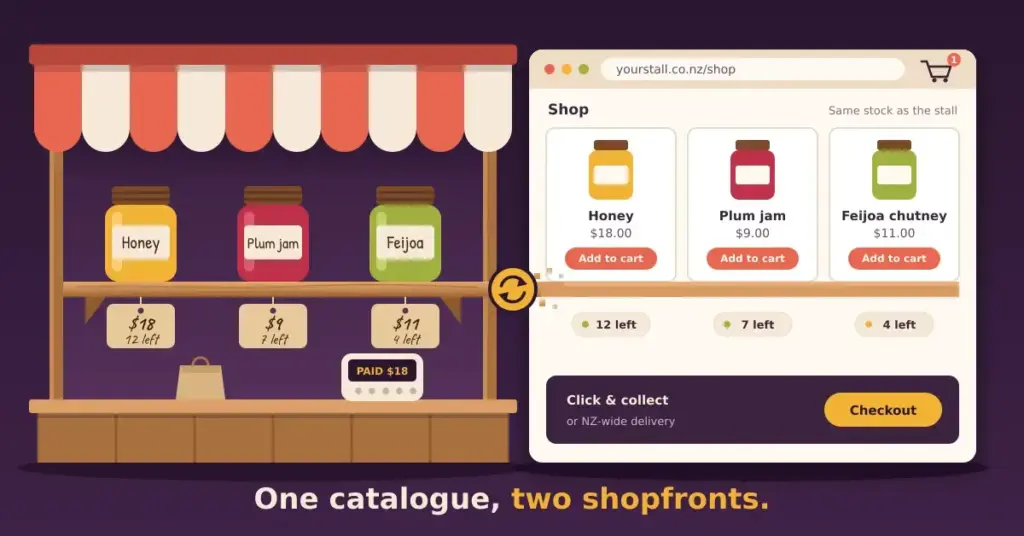
Square Online is Square’s website and online-store builder — the digital counterpart to the Square card readers and Point of Sale system many New Zealand cafés, retailers and market stalls already use. Its whole design goal is to make selling online an extension of selling in person, with one shared catalogue of products, orders and customers across both.
If you’re weighing it up for a Kiwi business, this guide covers what it actually does well, where it falls short, how the plans are structured, and how it compares to running your own WordPress site.
What Square Online actually is
Unlike a general-purpose website builder, Square Online is an e-commerce engine first and a website builder second. That focus is the point: if you sell things, it handles the fiddly parts — checkout, tax settings, shipping and pickup options — largely out of the box, and keeps your online stock in step with your in-store sales automatically.
The strongest reason to choose it is the Square ecosystem. If your till is already a Square terminal, Square Online means you don’t run two separate systems that need reconciling — one sale, whether in the shop or on the website, draws from the same inventory. It also leans into the things small NZ retail and hospitality businesses actually need: click and collect, QR-code menus and table ordering for cafés, and appointment booking for services.
Who Square Online is a good fit for
Strong fit
- You already use (or want) Square POS in-store
- Retail, café, or restaurant needing click & collect
- Services taking online appointments
- You want to start free and keep setup simple
Look elsewhere if
- Content marketing or blogging is central
- You want deep design or layout control
- You need to avoid per-transaction fees
- You want to own and move your site freely
How the plans work
Square Online is free to start, which genuinely sets it apart — few serious e-commerce platforms let you build and sell without a monthly fee. The trade-off is in the details of each tier.
How the plans work
Square Online uses a “start free, pay as you grow” model. Rather than quote figures that change, here’s the shape of it:
- Free plan: build and sell with no monthly fee, but you get a Square subdomain and Square branding, and pay a per-transaction processing fee.
- Paid tiers: add a monthly fee in exchange for a custom domain, removal of Square branding, extra features (such as QR-code ordering), and a lower per-transaction fee.
Exact prices and fees change and differ by country — check Square’s official New Zealand pricing before you decide.
The important thing to understand is the two kinds of cost: a possible monthly plan fee, and a per-transaction processing fee taken on each sale. The free plan has no monthly fee but a higher processing rate and Square branding on your site; paid tiers add a monthly fee but let you use your own domain, drop the branding and reduce the per-sale cut. Because those exact figures change over time and differ between countries, the honest advice is to read them off Square’s official New Zealand pricing page rather than trust a number quoted in any article, including this one.
Strengths and limitations
Where Square Online shines is speed and integration. Setup is genuinely quick, PCI compliance and an SSL certificate are handled for you, and the familiar Square checkout is something Kiwi shoppers already trust. For a business that just wants to be selling online by the end of the week without becoming a webmaster, that’s a real advantage.
The limitations are the flip side of that simplicity. Design is template-based, so you get tidy, mobile-friendly results but limited control over layout. The blogging and content tools are basic, which matters if content marketing is central to how you attract customers. And your site lives inside Square’s ecosystem — convenient while you’re in it, but not something you can pick up and move to another host the way you can with an open platform.
Square Online vs WordPress
For many New Zealand businesses the real decision is Square Online versus a self-hosted WordPress site. It comes down to the classic ease-versus-power trade-off.
Square Online vs self-hosted WordPress
The choice is ease and a managed setup versus control and portability.
| Square Online | WordPress (self-hosted) | |
|---|---|---|
| Setup | Fast; connect POS and go | More setup; hosting + theme |
| E-commerce | Built in, POS-synced | Via WooCommerce plugin |
| Design & content | Template-based; basic blogging | Open-ended; strong blogging/SEO |
| Maintenance | Managed by Square | You manage updates & backups |
| Ownership | Tied to Square’s ecosystem | Portable; move host any time |
Square Online wins on getting started and on unifying in-person and online selling with no fuss. WordPress wins on control: unlimited design and functionality, far deeper content and SEO capability, and — importantly — portability. A WordPress site is yours to move between hosts freely, whereas a Square site is tied to Square. A common path is to start on Square Online for the quick win, then move to a WordPress hosting setup once your needs outgrow a template — more custom design, serious content marketing, or simply the desire to own your platform outright.
If you’re still at the “which tool?” stage more broadly, our guide to choosing a website builder in New Zealand walks through the whole field, and our look at free website builders covers what “free” really includes — relevant here, since Square’s free plan is one of the better ones. For newer AI-assisted options, see our best AI website builder guide.
Features and pricing for Square Online change over time and vary by country. The figures and inclusions described here are general; confirm the current New Zealand plans, fees and terms directly on Square’s official site before making a decision.
Reference sources
Frequently asked questions
Is Square Online free?
Square Online has a genuine free plan with no monthly fee — you build and sell, and pay only a per-transaction processing fee on each sale. The free plan uses a Square subdomain and shows Square branding; paid plans remove those. Check Square’s NZ pricing for current processing rates.
Can I use a .nz or .co.nz domain with Square Online?
The free plan uses a Square subdomain, but the paid plans let you connect your own custom domain, including a .nz or .co.nz address. You’ll need to be on a paid tier to point your own domain at the site.
Does Square Online handle GST for New Zealand sales?
Yes, you can configure tax settings so the standard 15% NZ GST is applied to domestic transactions. As with any tax setup, it’s worth checking the configuration against your own accounting requirements.
Who is Square Online best for?
Businesses that sell in person and want a matching online store with minimal setup — particularly retail, cafés and restaurants using Square POS, and service businesses taking online bookings. Its inventory sync and click-and-collect features are built for exactly that.
What are the downsides of Square Online?
Design is template-based with limited layout control, the blogging tools are basic, and your site is tied to Square’s ecosystem rather than being portable. Businesses that prioritise content marketing, deep customisation, or owning their platform often prefer WordPress.
Should I use Square Online or WordPress?
Choose Square Online for speed, simplicity and tight POS integration. Choose WordPress for design freedom, stronger content and SEO capability, and a site you can move between hosts. Many businesses start on Square and migrate to WordPress as they scale.
Can I move my Square Online store to WordPress later?
There’s no one-click migration, but you can export your product catalogue and rebuild on WordPress with WooCommerce. It’s a manual process, which is itself a reminder of the ownership difference between a hosted builder and a self-hosted site.