You can put a working website online today without spending anything. That’s genuinely true, and for testing an idea, showing a portfolio or getting a community group visible, a free plan is often the right call rather than a compromise.
What’s less well explained is that “free” means at least four different things depending on the platform, and the differences matter far more than the template gallery does.
This guide sets out those differences, covers which platforms are worth using in 2026 and which are being quietly wound down, and explains the single upgrade that changes more than any other.
The four kinds of “free”
Free plans fall into distinct categories, and knowing which one you’re signing up for tells you most of what you need.
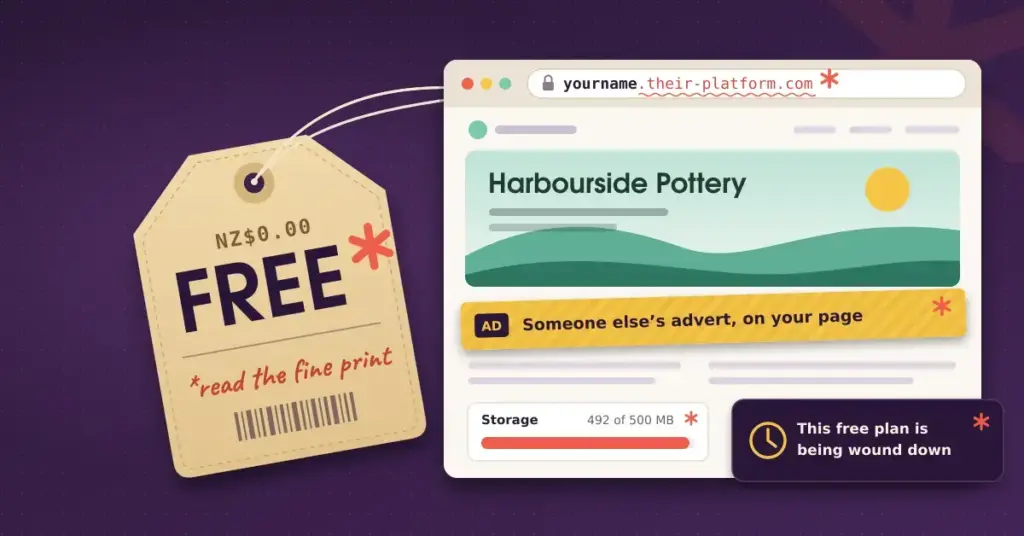
Ad-supported free. The platform places its own advertising on your pages. Wix and WordPress.com both do this. The cost isn’t money — it’s that a page whose job is to advertise you is also advertising someone else.
Subdomain free. No ads, but your address belongs to the platform: yourbusiness.carrd.co rather than yourbusiness.co.nz. Carrd, Canva Websites and Framer work this way. This is the mildest version and the most common.
Capped free. Honest, hard limits you can plan around — a page count, a site count, a storage or bandwidth ceiling. Webflow’s free tier caps pages; Carrd caps how many sites you can publish. Fine if you check the cap before you build rather than after.
Genuinely free. No ads, no subdomain requirement, no upsell tier. Google Sites, GitHub Pages and Cloudflare Pages will host a site on your own domain at no cost indefinitely. The trade-off is design flexibility, not money.
Four kinds of “free”
Check which one you’re signing up for before you start building.
| Type | What you give up | Examples |
|---|---|---|
| Ad-supported | Platform advertising on your pages | Wix, WordPress.com |
| Subdomain | Your address is theirs; no ads | Carrd, Canva, Framer |
| Capped | A hard limit on pages, sites or storage | Webflow, Carrd, Canva |
| Genuinely free | Design flexibility — but your own domain, no ads, $0 | Google Sites, GitHub Pages, Cloudflare Pages |
That last category matters because of a claim you’ll see repeated everywhere: that every free builder blocks custom domains behind a paid tier. That isn’t true. Most do — Wix, WordPress.com, Webflow, Carrd and others gate it — but Google Sites, GitHub Pages and Cloudflare Pages don’t. If your priority is a professional address at zero monthly cost, that’s the route.
The platforms worth considering in 2026
Pick by the job, not the templates
Free-plan limits change often — confirm current terms on the provider’s own page.
| If you want… | Start with | Trade-off |
|---|---|---|
| A blog or content site | WordPress.com free | Platform ads you don’t control |
| The easiest visual editor | Wix free | Prominent ad banner; template locked after publishing |
| Your own domain at no cost | Google Sites | Limited design and marketing features |
| A one-page profile or landing page | Carrd | One page only; no growth path |
| To test whether people will buy | Square Online | Stays on a Square subdomain |
| A quick brochure from a Canva design | Canva Websites | A published design, not a full site |
The strongest free tier for anything content-led — blogs, news, ongoing publishing. It has better writing and publishing tools than anything else in this list.
Two things to know. WordPress.com places its own ads on free sites, which you neither control nor earn from. And it’s the notable exception to the export problem: WordPress.com lets you export your content, which means the free plan is a genuine on-ramp to self-hosted WordPress later rather than a dead end.
The most flexible visual editor, with a free tier that’s real rather than a trial. You get a Wix subdomain and a prominent Wix advertising banner.
The constraint worth knowing before you start: you can’t switch templates after publishing without rebuilding, so treat the layout choice as close to permanent.
The only mainstream builder with no ads, no paid tier, and support for your own domain at no cost. Design flexibility is limited and there are no marketing or ecommerce features.
For a straightforward informational site — a community group, a club, a simple services page — this is frequently the correct answer, and almost nobody recommends it, because there’s no affiliate commission in doing so.
Single-page sites, done very well. The free plan publishes up to three sites on carrd.co subdomains. If you need a link page, a personal profile or a one-page landing page, it’s the fastest route to something that looks good.
The limitation is exactly what you’d expect: one page, and no growth path into a multi-page site without switching platforms.
If you already design in Canva, this is the shortest distance from a design to a published page. It’s a published design rather than a website in the fuller sense — no store, limited structure — but for a one-page brochure it’s quick and clean.
The unusual one: it allows real selling on a free plan, with no monthly platform fee, which most builders treat as paid-only. Free sites stay on a Square subdomain. Worth a look if you want to test whether people will actually buy before committing to a Shopify subscription.
Older guides still recommend Weebly as a top free builder. That advice has aged badly.
Square, which owns Weebly, has moved it into maintenance mode: no new features, the mobile app removed from the App Store and Google Play on 1 December 2025, and users steered toward Square Online instead. Square’s own support materials have given only limited, repeatedly revised commitments on how long the Weebly editor will be supported.
It still works and the free plan still exists. But starting a new business site on a platform its owner is visibly winding down is a poor use of your effort. If you’re already on Weebly, plan a move rather than reacting to an announcement later.
The one upgrade that matters most
If you only spend money on one thing, spend it on a domain.
A .nz domain costs roughly NZ$23 to NZ$50 a year — considerably less than any builder’s cheapest paid plan. A custom address does more for credibility than removing ads does, and it means the links and mentions your site earns build value for your brand rather than for wix.com or wordpress.com.
The catch is that most builders require a paid plan before they’ll let you connect one. There are two ways around that.
Use a platform that doesn’t. Google Sites, GitHub Pages and Cloudflare Pages all support a custom domain at no cost.
Register the domain now anyway. Even if you can’t connect it yet, securing the name stops someone else taking it while you’re deciding. Our guide to registering a .nz domain covers the process, and a registered domain can be pointed anywhere later.
What free tiers actually cost you in search visibility
Worth being precise here, because this gets overstated in both directions.
Google does not penalise a site for being on a free plan. There’s no ranking demotion for using a free tier.
The subdomain is the real problem. A site at yourbusiness.wixsite.com builds search authority for the platform’s domain, not yours. If you later move to your own domain, you start that part over.
Metadata and structural controls are often limited. Free tiers frequently restrict custom titles, meta descriptions and Open Graph data on individual pages, and you generally can’t edit sitemaps, robots.txt or redirects. Serious optimisation needs those.
Ads and load weight affect user experience, which affects the behaviour Google measures. That’s an indirect effect rather than a penalty, but it’s real.
The practical conclusion: a free site can rank, but the ceiling is low enough that if search traffic is a business objective, a domain and a paid tier are the first two things to buy. If it isn’t — a community group, a portfolio you share directly — none of this matters much.
When free stops being free
Every free plan has a ceiling. The common upgrade triggers are wanting your own domain, wanting the ads gone, needing to sell something, or hitting a storage or page limit.
At that point, a New Zealand-specific detail catches people out: the major builders bill in US dollars. A plan advertised at US$29 a month isn’t an NZ$29 expense — you carry the exchange rate, possibly a card fee, and there’s no New Zealand GST component to claim back. Convert before you compare with a local alternative.
At the point where you’re paying a monthly subscription anyway, it’s worth asking whether that money is better spent on hosting your own site, where adding features doesn’t mean upgrading a plan tier. Our companion guide on choosing a website builder works through that comparison properly.
Protecting your work while you’re on a free plan
Do these while you’re still on a free plan
- Register your domain now, even if you can’t connect it yet. It stops someone else taking the name and costs less than a month of most paid plans.
- Keep your text in your own documents. If it only lives in the editor, moving means retyping it.
- Keep original full-resolution images in your own storage, not just the platform’s media library.
- Install your own analytics from day one so the visitor data is yours regardless of platform.
- Check the cap before you build — pages, sites, storage or bandwidth, whichever your platform limits.
- Note the billing currency before you upgrade. Most builders charge NZ customers in USD.
Reality check: most platforms let you export your data. Almost none let you export your design. Plan for a rebuild, not a migration.
The most important habit is keeping your own copies of everything. Builder platforms differ enormously in what they let you take with you — most let you export data of some kind, almost none let you export your design. If your text lives only inside the editor and your images only in the platform’s media library, a move means retyping and re-sourcing all of it.
Keep master copies of your copy in documents, your original full-resolution images in your own storage, and install your own analytics from day one so the data is yours too.
This article is provided for factual and informational purposes only. It does not constitute professional, financial or purchasing advice, and it is not a recommendation to use any particular platform. Free-plan limits, pricing and platform availability change frequently, and the major builders bill in US dollars — check each provider’s current plan page before committing, and confirm the tax treatment of overseas subscriptions with your accountant.
Reference sources
- Website Builder Expert — Is Weebly shutting down? (mobile app removed 1 December 2025)
- Google Sites Help — Use a custom domain with your site
- GitHub Docs — About GitHub Pages (free custom-domain hosting)
- Cloudflare Pages — Custom domains at no cost
- WordPress.com Support — Export your content
- WordPress.com Support — Advertising on free sites
- Wix Help Centre — Exporting or embedding your Wix site elsewhere
- Square Help — Square Online pricing and free plan features
- Carrd — Plans, features and free-tier limits
- Horton Taylor — Website costs in NZ and USD billing
Frequently asked questions
Can I use a .co.nz domain on a free website builder?
On most, no — Wix, WordPress.com, Webflow and Carrd all require a paid plan. But Google Sites, GitHub Pages and Cloudflare Pages support a custom domain at no cost. If a free custom domain is your priority, those are the platforms to look at.
Do all free builders put ads on my site?
No. Wix and WordPress.com display their own advertising. Carrd, Canva and Framer show a subdomain but no ads. Google Sites shows neither. The claim that ads are universal on free tiers is inaccurate.
Is Weebly still a good choice?
Not for a new site. Square has moved Weebly into maintenance mode — no new features, the mobile app pulled from the app stores at the end of 2025, and users directed to Square Online. The platform still runs, but it’s being wound down.
Does Google rank free-plan websites lower?
Not for being on a free plan. The real disadvantages are that a platform subdomain builds authority for the platform rather than your brand, and that free tiers usually restrict the metadata and structural controls that meaningful optimisation requires.
Which free builder is best for selling products?
Square Online is unusual in allowing real selling on a free plan with no monthly platform fee. Most builders treat ecommerce as paid-only. Free Square Online sites stay on a Square subdomain.
What’s the cheapest way to look professional?
Buy a domain, roughly NZ$23 to NZ$50 a year, and use a platform that lets you connect one at no cost. That’s a more visible upgrade than removing ads, and cheaper than any paid plan.
Can I move my site off a free builder later?
Your content and data usually, your design almost never. WordPress.com is the standout exception with genuine export tools. Everywhere else, plan for a rebuild — which is why keeping your own copies of text and images from day one matters.