How to Transfer Domain Names in New Zealand: The Complete Step-by-Step Guide

Moving your digital asset between registrars can seem like a daunting technical hurdle, but learning how to transfer domain extensions smoothly is an essential skill for any Kiwi business owner or website administrator. Whether you are looking to consolidate multiple web addresses under a single dashboard, escape high annual renewal fees from an unverified overseas provider, or upgrade your underlying web infrastructure to a high-performance local cloud host, executing a domain migration requires following specific regulatory guidelines.

In Aotearoa, the management and stability of the local registry space are strictly overseen by the Domain Name Commission (DNC), ensuring that any change of registration provider follows secure cryptographic verification steps. This comprehensive, practical guide walks you through the exact technical procedures required to transfer your valuable web identifiers safely, manage your Domain Name System (DNS) text records accurately, and prevent any costly disruption or unexpected downtime for your live website and official corporate cloud email systems.

  • Significant Capital Conservation: Moving away from high-priced international registration services to an affordable local provider slashes your annual operational maintenance costs.
  • Unified Digital Management: Consolidating all your web addresses, web hosting packages, and cloud security protocols inside a single dashboard saves valuable administrative time.
  • Enhanced Technical Support Access: Partnering with an authorized local provider gives your internal team direct access to responsive support technicians during standard New Zealand business hours.
  • Zero Transaction Operational Downtime: Executing the migration sequence carefully ensures that your live digital storefront and corporate communication networks remain completely functional throughout the move.
  • Advanced Cyber Security Integration: Migrating your domain allows you to deploy modern cryptographic protections, such as two-factor authentication (2FA) and DNSSEC protocols, at the registrar layer.

Understanding the New Zealand Domain Name Commission Registry

The underlying framework that governs the registration, modification, and technical transfer of country-code top-level domains (ccTLDs) like .co.nz and .nz is highly unique compared to standard global extensions. In Aotearoa, the Domain Name Commission (DNC) serves as the independent local regulatory body tasked with enforcing strict operational guidelines, fair trading standards, and robust consumer-first policies across the entire local domain space. Unlike generic global extensions that operate with very little central oversight, the local registration ecosystem is carefully monitored to prevent fraudulent transfers, minimize identity theft risks, and maintain absolute registry stability.

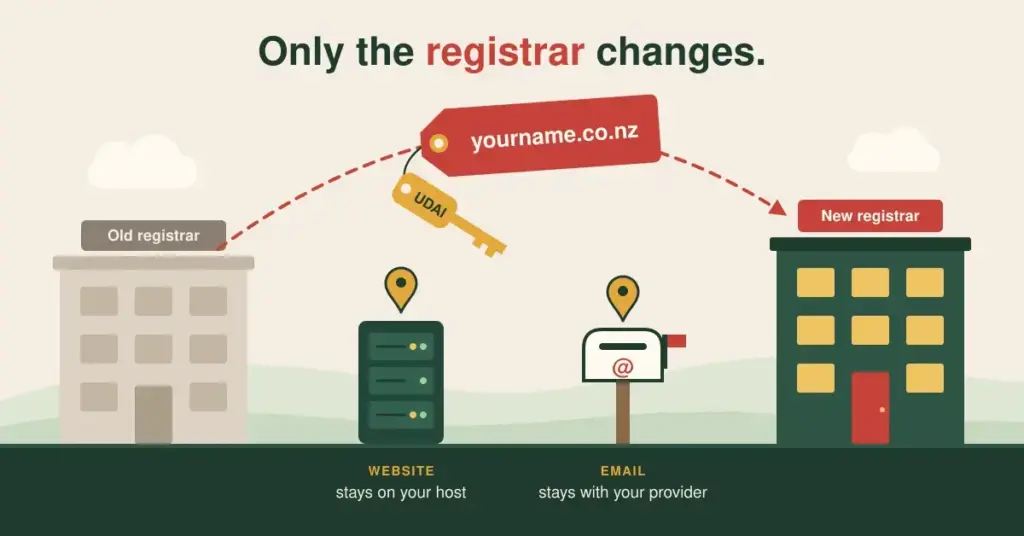
When a Kiwi business operator initiates a process to change their registration provider, the transaction does not pass through automated overseas brokers; instead, it is validated instantly using a secure cryptographic password known as an UDAI (Unique Domain Authentication Identifier). This secure identifier system ensures that you retain complete, absolute legal ownership of your digital assets throughout the migration process. It completely eliminates the risk of malicious third parties attempting to steal your web traffic or hijack your domain names, providing a safe, reliable, and well-regulated environment for managing your digital corporate presence.

Comparing Local Domain Transfers with Global Extensions

  • Instantaneous Processing Lifecycles: Local extensions like .co.nz and .nz typically migrate between authorized providers almost instantly once a valid UDAI password is submitted.
  • Zero Enforced Holding Windows: Unlike generic global extensions that lock domains from moving for up to 60 days post-modification, the local registry allows you to move your asset whenever necessary.
  • Affordable Regulatory Fee Structures: The DNC ensures that registry transfer requests carry zero hidden administrative penalties, meaning you only pay standard local renewal rates.
  • Transparent Dispute Resolution Access: If an unauthorized or fraudulent transfer occurs, local businesses can instantly lodge a claim through the DNC’s Dispute Resolution Service (DRS).

Why Kiwi Businesses Choose to Migrate Their Digital Assets

There are several major practical business reasons why a New Zealand enterprise or sole trader might choose to evaluate their current registrar relationship and execute a domain migration. The most common driver is the desire to escape confusing, multi-layered pricing models used by large international providers. Many overseas registrars hook new users with cheap initial registration prices, only to charge exorbitant renewal fees for subsequent years, quickly driving up your long-term digital maintenance costs.

Another critical factor is the quality of customer support. If your website experiences a temporary connection issue or your email servers experience an unexpected routing failure, dealing with automated ticketing systems or support agents in distant time zones can cause immense stress. Partnering with a dedicated local provider ensures you can jump on a brief phone call or receive prompt assistance during local business hours, allowing you to resolve technical hiccups before they impact your customer leads or direct digital revenue.

The Strategic Importance of Your Unique Domain Authentication Identifier

The single most critical element required to complete a successful local domain migration is your Unique Domain Authentication Identifier, commonly referred to as the UDAI password. This highly confidential alphanumeric string acts as a digital key that unlocks your domain record at the central registry, granting permission for a new authorized provider to take over technical management of the asset. Because this key carries immense security weight, understanding how to extract and handle it safely is the absolute foundation of secure asset management.

Under official DNC policies, your existing registration provider is legally required to make your UDAI key readily accessible to you upon request, without charging any hidden administrative fees or locking your account panels. Most modern registrars provide an automated button within your profile settings that generates a fresh UDAI password instantly. Once this key is created, it remains fully active for a limited window—typically 30 days—before automatically expiring, adding a powerful layer of cryptographic defense to protect your digital properties from unauthorized transfer attempts. Wikipedia

Key Rules for Handling Your Confidential Cryptographic Key

  • Never Share via Unsecured Email: Avoid sending your active UDAI password across open messaging networks to minimize the risk of intercept scrapers.
  • Verify Key Character Case: Alphanumeric registry codes are highly case-sensitive, meaning you must copy and paste the string exactly as displayed.
  • Check Expiration Timeframes: Ensure you process your transfer request promptly after generating the key to avoid hitting automated expiration windows.
  • Do Not Pay Retrieval Fees: If an old provider attempts to bill you for accessing your authentication code, lodge an immediate complaint with the DNC.

Preserving DNS Record Integrity to Prevent Site Downtime

One of the biggest mistakes a website administrator can make when executing a domain transfer is forgetting to document and copy their existing Domain Name System (DNS) configurations prior to launching the migration request. Your DNS panel acts as the virtual air traffic control tower for your digital presence, using specific record lines to direct internet browsers to your web files and route incoming client messages straight to your email servers. If these records are wiped out during a sloppy provider shift, your live platform will go completely offline and your business emails will bounce instantly.

To completely remove this operational risk, you must perform a comprehensive audit of your active zone files before touching any transfer settings. Take the time to manually copy or export your critical A records (which link your domain to your web hosting servers), your MX records (which control your professional cloud email accounts), and your TXT or CNAME records (which handle vital security verifications for tools like Google Workspace or Microsoft 365). Documenting these technical pointers allows you to recreate your routing framework inside your new provider panel seamlessly, ensuring a completely flawless transition with zero operational disruption.

DNS Record TypeCore System FunctionCritical Operational Impact
A RecordMaps your web address text to your physical web hosting server IP address.Controls whether human visitors can access your live website pages.
MX RecordDirects your corporate email traffic to your cloud communication platform.Ensures incoming customer inquiries reach your staff inboxes safely.
TXT RecordHandles secure domain verifications and anti-spam authentication protocols.Protects your outgoing corporate emails from hitting clients’ spam folders.
CNAME RecordCreates clean aliases for subdomains, such as linking shop.yourbrand.nz.Manages navigation pathways for specialized secondary platform assets.

A Complete Roadmap to Transferring Local Web Addresses

Once you have documented your active DNS configurations and verified that your primary registrant contact email address is fully accessible, you are ready to initiate the technical transfer sequence. By following a structured, step-by-step methodology using an authorized local provider, you can complete the entire migration process cleanly and efficiently in just a matter of minutes.

The Technical Transfer and Connection Sequence

Log into your legacy provider’s management panel, navigate to the domain security settings area, and request the system to generate a fresh UDAI key for your address.

Open an account with your new trusted local provider and input your documented A, MX, and TXT record lines into their nameserver zone management board before starting the move.

Navigate to the transfer panel of your new provider, input your web address alongside the valid UDAI key, and click through to authorize the transaction.

Confirm that the registry status updates to show your new provider as active, check that your website and email structures resolve perfectly, and verify your secure HTTPS padlock.

Technical Warning: While local extensions like .co.nz migrate between providers almost instantly, the process of global DNS propagation can still take anywhere from 2 to 24 hours to complete across all international networks. Plan your migration work during off-peak hours or over a quiet weekend to minimize any potential impact on your day-to-day business operations.

Managing Administrative Details and Account Permissions

Successfully migrating your domain name record to a high-performance local registrar involves more than just entering a secure code; it is also the perfect opportunity to audit and clean up the administrative contact details attached to your digital profile. Every domain record on the central registry holds specific registrant contact logs that detail the legal owner, administrative manager, and technical point of contact for the web address. If these files contain outdated personal emails or display the contact information of a former employee or external agency, your business faces significant operational risks.

During the transfer process, make sure to thoroughly update your profile files to ensure your business is listed as the absolute legal entity holding the asset, utilizing your official corporate name and a valid New Zealand Business Number (NZBN). Ensure the primary registrant email is a permanent, closely monitored corporate inbox that remains fully independent of the domain itself—this safeguard ensures that you can always receive critical technical warnings, policy updates, and registry verification links even if your main hosting servers experience a temporary system outage.

  • Validate Legal Ownership: Always confirm your official corporate entity is written as the primary registrant to protect your intellectual property rights.
  • Maintain Independent Emails: Utilize an external email provider for registry contact logs to guarantee access during severe server failures.
  • Audit Administrative Access: Limit master account management permissions strictly to verified corporate directors and trusted technical leads.
  • Enforce Strict Profile Cleanups: Remove obsolete developer contacts and former agency permissions to block unauthorized system edits.

Protecting Your Moving Asset from Malicious Cyber Threats

The transition window during a domain transfer is a high-target period where your corporate digital assets can become vulnerable to malicious cyber threats and sophisticated social engineering scams. Cybercriminals regularly monitor public registry feeds to spot moving domains, often sending out fake automated invoicing demands or deceptive phishing emails designed to trick distracted business owners into handing over sensitive account passwords or processing fraudulent payments. Protecting your brand requires training your team to recognize and block these malicious traps.

A professional local registrar delivers an elite line of defense against these security threats by offering advanced account protection features completely free of charge. The moment your transfer processes successfully, you should instantly log into your new dashboard area and activate mandatory two-factor authentication (2FA) across all administration profiles, requiring a secondary mobile security code to authorize any future data modifications. It is also highly wise to deploy cutting-edge security extensions like DNSSEC (Domain Name System Security Extensions), which adds a powerful layer of cryptographic verification to your web address, completely preventing malicious actors from hijacking your web traffic or spoofing your brand online.

Advanced Security Protections for Moving Assets

Security Feature NameCore Protective FunctionalityLong-Term Strategic Corporate Benefit
Two-Factor Authentication (2FA)Demands a unique, time-sensitive security token alongside standard passwords.Completely blocks brute-force profile hacking attempts from external sources.
DNSSEC Cryptographic SigningAttaches automated mathematical keys to validate your server routing lines.Guarantees local web visitors always land on your authentic hosting platform.
Registry Registrar LockDisables automated online modification or transfer requests at the registry level.Prevents accidental modifications or unauthorized domain transfer attempts.
Encrypted Activity LoggingMonitors and records every technical configuration edit inside your account panel.Gives your IT leads complete visibility to audit profile actions over time.

Aligning Domain Migrations with Web Hosting Upgrades

Many forward-thinking Kiwi business operators choose to align their domain transfer timelines with a comprehensive upgrade to their underlying web hosting environment. If your website code is bogged down by slow response times from cheap, overseas shared hosting packages, migrating your domain name over to an established local infrastructure specialist provides the perfect opportunity to shift your website database over to high-performance local cloud servers at the exact same time.

When your website files sit on high-speed servers physically located in New Zealand data centres, the physical distance data has to travel to reach your local visitors is dramatically reduced, resulting in near-instant page loading speeds. This technical performance boost delivers an exceptional browsing experience for mobile users browsing your pages over local mobile networks, while signaling massive quality metrics to search engine ranking algorithms. By combining your domain transfer with a local cloud hosting upgrade, you transform your entire online presence into a fast, highly secure corporate asset that drives consistent customer leads and long-term digital profitability.

Supercharging Trust via Custom Brand Email Infrastructures

Executing a smooth domain migration allows you to completely clean up your corporate communication networks and eliminate the major branding mistake of using a free, generic email address (such as [email protected]) for your official customer messages. Operating with a generic email address instantly signals a lack of scale, damages your brand authority, and can cause security-conscious clients to question whether your business is fully legitimate. By connecting your custom web address to a professional cloud email service during your transfer setup, you can instantly create polished, authoritative email accounts (such as [email protected]) that build immediate trust with every message you send.

Using custom business emails also delivers significant practical advantages for your day-to-day operations, marketing campaigns, and data security. Professional email platforms come packed with advanced spam filtering tools, robust data encryption protocols, and extensive storage capacities that far outperform basic consumer accounts. Furthermore, setting up clear, role-specific email addresses allows you to organize your incoming client communications efficiently, ensuring billing inquiries, sales leads, and general support tickets are routed to the right team members instantly.

  • Instant Customer Credibility: Establishes a highly polished, professional first impression that shows clients you operate an established, secure business.
  • Continuous Brand Reinforcement: Every invoice, formal quote, and customer update you send out actively promotes your primary web address and brand name.
  • Advanced System Security Filters: Protects your business communications with enterprise-grade spam tracking, data encryption, and malware filters.
  • Frictionless Administrative Scaling: Allows you to create fresh, custom mailboxes for new staff members instantly as your internal operational team grows.

Navigating the Defensive Domain Protection Space

Once you have successfully learned how to transfer domain assets and settled your core web address safely inside a premium local registrar dashboard, it is highly wise to review your broader brand protection strategy. In the modern digital economy, malicious entities and direct competitors regularly engage in predatory practices like typosquatting—the practice of registering common misspellings or alternative extensions of established corporate names to siphon away your traffic or run confusing lookalike marketing campaigns nearby.

To protect your hard-earned market reputation from these corporate risks, a smart long-term strategy involves searching for and securing a defensive block of alternative extensions and common typing slip-ups attached to your brand name. Use your registrar’s dashboard to buy up the modern short .nz extension alongside your traditional .co.nz string, and grab common singular or plural variations of your trademark. Once these defensive variants are safely under your control, you can easily implement permanent 301 server redirects to automatically send any user who makes a typing mistake straight to your primary homepage, securing a complete digital monopoly over your unique brand name.

Target Domain Protection AssetSpecific Risk MitigatedPractical Strategic Value
Shorter Direct .nz ExtensionBlocks direct brand duplication on the modern short extension.Secures a clean, highly memorable link for social media marketing campaigns.
Common Singular/Plural FormsCaptures web users who mix up formatting when typing your address.Eliminates user confusion and guarantees seamless navigation.
Alternative Commercial ExtensionsStops competitors from launching confusing lookalike sites nearby.Protects your unique intellectual property rights across the market.
Common Phonetic Typing TyposIntercepts traffic from users who make quick mistakes on touchscreens.Keeps your hard-earned marketing traffic directed safely to your site.

Troubleshooting Common Migration Failures and Account Locks

While the local country-code domain transfer framework is designed to be highly automated and streamlined, technical administrators can occasionally hit unexpected system blocks or transaction rejections during the migration sequence. Understanding the primary technical reasons behind these transfer hiccups allows your team to troubleshoot issues quickly, remove administrative barriers, and get your migration completed without extended system delays.

The single most common reason a domain transfer request fails is the submission of an expired, mistyped, or completely invalid UDAI password. Because these cryptographic registry keys are highly case-sensitive and feature complex mixes of numbers, letters, and special characters, a single typing slip-up will cause the central registry server to instantly reject the transaction. Another common barrier is an active registrar-lock status applied to your account panel by your legacy provider—this security feature must be manually toggled to the “off” position inside your old administration dashboard before your new registrar can request the asset.

  • Fixing Case-Sensitive UDAI Blunders: Always copy and paste your authentication key directly from the master generation sheet to avoid manual character entry errors.
  • Deactivating Legacy Profile Account Locks: Log into your old registrar panel to confirm your security status is flagged as fully open for external transfer requests.
  • Resolving Conflicting Registrant Emails: Update your legacy contact profile files to guarantee you can receive and click through structural verification alerts.
  • Clearing Outstanding Invoicing Balances: Confirm with your old provider that all previous technical service invoices are fully settled to eliminate administrative holds.

Summary

Successfully managing a digital asset migration by learning how to transfer domain extensions securely is a major strategic milestone for any growing New Zealand company. Moving your web identifiers away from unverified global platforms in favor of an authorized local registrar allows you to slash your annual maintenance expenses, consolidate your digital management dashboards, and deploy cutting-edge cyber security protocols like DNSSEC and 2FA.

The absolute secret to long-term digital migration success lies in documenting your active DNS zone files meticulously prior to launching your request—this vital safeguard ensures that your live website code, e-commerce checkouts, and corporate cloud email networks continue to perform flawlessly across local mobile networks throughout the entire provider shift. By combining defensive brand registrations, professional custom email architectures, lean technical code design, and high-performance local cloud hosting servers, you transform your primary web presence into a permanent corporate asset that drives consistent customer traffic, protects your intellectual property, and builds lasting enterprise value for your company.

FAQ

What does it mean to transfer a domain name, and how does the process work in NZ?

A domain name transfer is the secure technical process of shifting the management and annual renewal administration of your web address from one authorized registrar to another. In New Zealand, this transaction is heavily regulated by the Domain Name Commission and validated instantly using a unique cryptographic password known as an UDAI key, which protects your legal ownership rights throughout the move.

What exactly is an UDAI password, and where do I find it to start a transfer?

An UDAI (Unique Domain Authentication Identifier) is a secure, case-sensitive alphanumeric password that acts as a digital key to unlock your domain record at the central registry. You can easily generate a fresh UDAI key completely free of charge by logging into your existing registrar panel and navigating to your domain security or management settings.

Will my live website experience downtime or go offline during the transfer process?

No, if you take the time to document your active DNS text records and input matching zone files into your new registrar panel before processing the move, your live website and email networks will remain completely functional. Local extensions like .co.nz migrate almost instantly, meaning your technical routing paths will continue to resolve normally without any system downtime.

How much does it typically cost to transfer a .co.nz or .nz domain name?

Initiating a domain transfer request for local New Zealand extensions carries absolutely zero hidden administrative transfer fees or registry penalties. When you process the migration through a transparent local registrar, you simply pay their standard flat-rate fee for an annual domain renewal, which extends your existing lease agreement for an added 12 months.

Can I migrate my domain name if it has accidentally expired with my old provider?

Yes, you can generally still transfer a domain name that has recently expired, provided the address sits within its standard grace period and has not been completely deleted from the central registry database. You will need to log into your old account panel to extract a fresh UDAI key, or contact your legacy provider to request the authorization code manually.

What is the main operational difference between .co.nz and direct .nz extensions?

The historic .co.nz extension represents the long-standing commercial standard across New Zealand and commands a massive degree of legacy authority from consumers who have trusted it for decades. The shorter direct .nz extension provides a highly modern, streamlined alternative that is exceptionally mobile-friendly and highly memorable for fresh digital branding campaigns.

Why should I choose an authorized local registrar over a cheap overseas provider?

Partnering with an authorized local registrar guarantees flat-rate pricing with absolutely no hidden upcharges, safe data storage on secure local servers, and direct access to expert technical support during standard New Zealand business hours. Overseas providers often utilize confusing sales funnels and leave you stuck in lengthy support queues when technical issues arise.

How does activating two-factor authentication protect my migrated digital assets?

Enabling two-factor authentication (2FA) across your registrar profile requires a unique, time-sensitive security code from a mobile app alongside your standard password to authorize any data edits. This advanced layer of defense completely blocks unauthorized hackers from attempting to hijack your server paths or steal your domain name.

Can I transfer my professional cloud email accounts alongside my web address?

Your cloud email mailboxes (such as Google Workspace or Microsoft 365) sit on separate cloud servers and are not physically moved by a domain transfer. By copying your active MX and TXT records accurately over to your new registrar panel during the migration, you ensure your incoming and outgoing business emails continue to route perfectly without interruption.

What technical steps should I take if an old registrar refuses to release my UDAI key?

Under official policies enforced by the Domain Name Commission, your existing provider is legally required to make your UDAI key readily accessible to you without charging any hidden fees or locking your panels. If an old registrar refuses to release your code or ignores your requests, you can lodge an immediate complaint with the DNC to force a registry transfer.