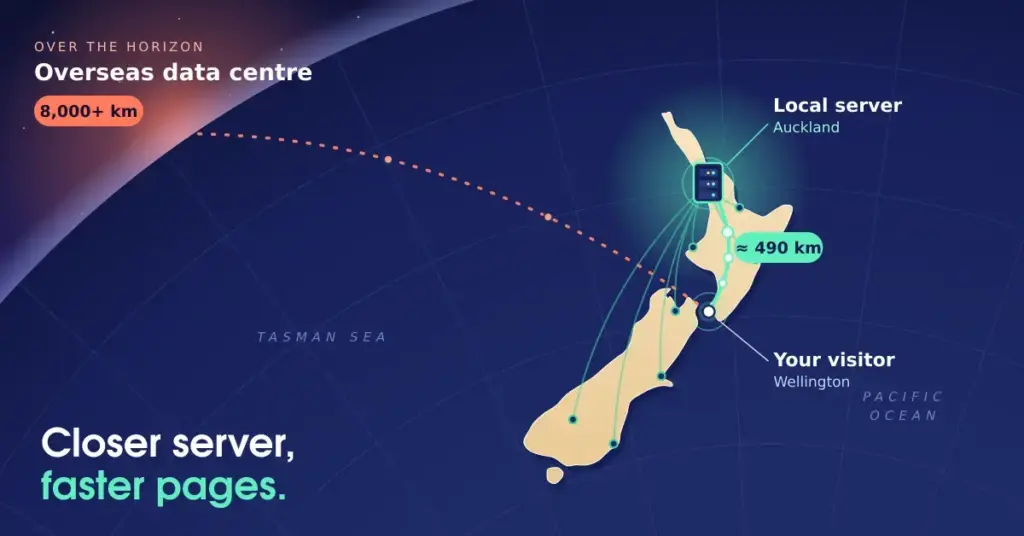
Choosing WordPress hosting in New Zealand comes down to a few things that genuinely matter: how fast your site responds for local visitors, whether support is available in your own timezone, and whether the environment is tuned for WordPress rather than generic websites. This guide walks through what quality managed hosting includes, how local servers affect speed and search performance, and how to pick a plan that fits your site — without the myths that often cloud the topic.
Why local hosting matters (and what it actually does)
New Zealand’s distance from the big overseas data centres is the practical reason local hosting helps. When your server sits closer to your audience, data travels a shorter distance, which lowers latency and speeds up every page load. That’s the real, measurable benefit — alongside billing in NZD, support during Kiwi business hours, and keeping your data within New Zealand’s jurisdiction.
It’s worth being precise about the SEO side, because it’s widely overstated. A New Zealand server does not, by itself, hand you a ranking “boost,” and a .nz domain is at most a modest geographic signal — not an authority multiplier. What local hosting does is make your site faster, and speed is what search engines reward.
What local hosting does — and doesn’t do — for SEO
The benefit is real, but it’s about speed, not a location “boost”.
| What actually helps | Why |
|---|---|
| Lower latency for NZ visitors | A closer server means faster response (TTFB) and load times. |
| Better Core Web Vitals | Aim for LCP < 2.5s, INP < 200ms, CLS < 0.1; a fast host helps. |
| Lower bounce, longer visits | Faster pages keep visitors — an indirect ranking benefit. |
A NZ server or a .nz domain is at most a modest geographic signal — not an authority or ranking “boost”. The SEO value of local hosting comes through speed and user experience, not location itself.
So the honest version is: host locally for speed, support and simplicity, and let the SEO benefit follow from a faster, better experience — not from the server’s postcode.
What managed WordPress hosting includes
The difference between generic web hosting and managed WordPress hosting is a layer of optimisation and maintenance built specifically for the platform. Instead of just storing your files, a managed host tunes the server for WordPress’s PHP and database needs, handles the routine technical work, and keeps the software current.
What “managed” WordPress hosting usually includes
- Server-side caching tuned for WordPress, so pages serve faster.
- Automatic core updates and security patching, so you’re not doing it by hand.
- Staging environments to test changes before they go live.
- Automated backups stored off-site, for quick recovery.
- Security scanning and a firewall that understands WordPress-specific attacks.
- Free SSL (typically Let’s Encrypt) and often free migration onto the host.
Inclusions vary by provider and plan — check what’s bundled versus charged extra.
For a business owner, the value is fewer technical headaches: updates, backups and security monitoring happen in the background, and a staging environment means you can test a change without risking the live site. It’s the difference between renting a bare server and having a maintained platform.
Speed: the part that pays you back
Site speed drives both user experience and search performance, and it starts with the host. The single biggest lever is minimising the distance between server and visitor to lower Time to First Byte. Good local hosts build on that with fast hardware — NVMe SSDs, modern web servers like LiteSpeed, and current protocols such as HTTP/3.
You can extend those gains at the site level. Object caching stores database query results so the server does less work on each page load — especially valuable for dynamic sites running WooCommerce — and a content delivery network distributes static files like images and CSS from nodes closer to your visitors. Aim to keep the Core Web Vitals in the green: LCP under 2.5 seconds, INP under 200 milliseconds, and CLS under 0.1. For a deeper look at squeezing performance out of a WordPress site, our guide to high-speed WordPress in NZ covers the site-side tuning.
Security you should expect
Because WordPress powers a huge share of the web, it’s a constant target for automated attacks. A good WordPress host filters that traffic before it reaches your site, with a web application firewall that recognises WordPress-specific threats like brute-force logins and known plugin vulnerabilities. Beyond the firewall, look for daily off-site backups for disaster recovery, two-factor authentication on your hosting account, DDoS mitigation, and a free SSL certificate (usually Let’s Encrypt) as standard — HTTPS is both a security baseline and a search requirement.
Scaling as you grow
Traffic rarely stays flat. Quality hosting lets you add CPU, RAM and storage as your site grows or during campaign and seasonal spikes, ideally without downtime. Cloud-based setups make this elasticity straightforward — resources are allocated on demand — so your site stays responsive when a lot of people arrive at once. The key resources to watch are CPU cores (concurrent requests), RAM (complex themes and plugins), NVMe storage (database read/write speed), and bandwidth (monthly data transfer).
Support, email and cost
Support is the most underrated factor. When something breaks, a technician who specialises in WordPress and works in your timezone can often spot a theme-and-plugin conflict in minutes — far faster than generic hosting support unfamiliar with the platform’s quirks.
Email is frequently bundled: many plans include professional addresses that match your domain, with anti-spam filtering and proper SPF/DKIM records so your business mail doesn’t land in spam. A domain-matched address reads as more credible than a free consumer one.
On cost, the cheapest option usually isn’t the best value. Budget international hosts often pack thousands of sites onto one server, which shows up as inconsistent speed and higher security risk. Weigh the price against the cost of lost sales from a slow site or fixing a compromised one, and look for genuinely all-inclusive plans — free migration, backups and staging included rather than charged as extras.
Choosing a plan
The right plan depends on your site’s complexity and expected traffic. A local tradesperson’s brochure site has very different needs from a store with hundreds of products, so start by assessing your current traffic and media library, then pick a tier you can grow out of.
Matching a plan to your site
| Plan level | Good for |
|---|---|
| Starter | Blogs, portfolios, small local business brochure sites |
| Business | Growing sites needing more CPU/RAM and traffic headroom |
| E-commerce | WooCommerce stores with higher transaction demands |
| Enterprise / custom | High-traffic corporate sites needing dedicated resources |
Start by checking your current traffic and media library size — most hosts let you upgrade as you grow.
Most providers make it easy to start small and upgrade, so don’t over-buy on day one. If you’re weighing up how to compare providers more broadly, our guide to choosing web hosting in New Zealand covers what to look for, and you can see the specific providers we cover from the WordPress hosting home page. If you’re still deciding whether WordPress is the right platform at all, our WordPress overview is the place to start.
Hosting features, inclusions and prices vary by provider and change over time. Use this as a framework for what to look for, and compare current plans directly before committing.
Where your data sits — and what New Zealand law actually requires
Hosting locally genuinely lowers latency for New Zealand visitors, which is a real reason to do it. It’s worth being precise about the legal side, though, because it’s widely overstated. There is no data-residency requirement in the Privacy Act 2020. Under Information Privacy Principle 12, sending personal information to an overseas provider purely for storage or processing — where that provider doesn’t use it for its own purposes — isn’t treated as a disclosure at all. So offshore hosting isn’t automatically a breach, and New Zealand hosting isn’t automatic compliance. What keeps you compliant is what you collect, how you secure it, and your breach-response plan — see our WordPress setup checklist for NZ businesses for that layer.
One nuance the “Hosted in NZ” badge can hide: a server physically located here but operated by a foreign-owned provider may still be reachable under overseas law such as the US CLOUD Act. If jurisdiction genuinely matters to you, check who owns and operates the infrastructure, not just where the box sits.
For organisations that hold data relating to Māori, Māori Data Sovereignty principles may also guide where and how that data is governed — a consideration that sits alongside, not inside, the Privacy Act.
The real cost: renewals, currency and what should be included
The cheapest sticker price is rarely the best value, and the gap usually shows up at renewal. Entry discounts are typically tied to long terms and renew at a much higher rate — check the renewal price, not just the introductory one, before you commit. Currency matters too: an overseas host bills in USD, so your real cost moves with the exchange rate and can attract foreign-transaction card fees, whereas a domestic bill is in NZD with GST you can claim. And several things should be included rather than charged as extras — free SSL, daily off-site backups, staging, and free migration. A money-back guarantee is worth having so you can test real performance before committing. Our guide to choosing web hosting in New Zealand covers how to weigh these up.
Developer access for agencies and advanced users
If an agency manages your site, or you work on it yourself, look beyond staging to the tools that make maintenance safe and fast: SSH access, WP-CLI, Git-based deployment, and resource monitoring for CPU, RAM and PHP execution. The one thing that matters most is that the staging environment mirrors production, so a change tested in the sandbox behaves the same way once it’s live.
A note on green hosting
New Zealand’s electricity grid runs on roughly 80% renewable generation — largely hydro, geothermal and wind — so a locally hosted site tends to carry a lower carbon footprint than one on a fossil-heavy overseas grid. It shouldn’t be the deciding factor on its own, but it’s a reasonable tiebreaker between otherwise similar hosts, and it’s the kind of thing that comes up in ESG reporting and some procurement processes.
Reference sources
Frequently asked questions
What makes WordPress hosting different from standard hosting?
It’s optimised specifically for WordPress — server tuning for its PHP and database needs, WordPress-aware caching and security, and usually managed updates and backups — rather than a generic environment that treats all sites the same.
Will hosting in New Zealand improve my Google rankings?
Indirectly. A local server lowers latency and speeds up your site, and speed (via Core Web Vitals and lower bounce rates) supports rankings. But server location isn’t a direct ranking boost, and a .nz domain is only a modest geographic signal — the gain comes from being faster, not from location itself.
What is managed WordPress hosting?
Managed hosting means the provider handles the technical maintenance — software updates, security monitoring, backups and often caching and staging — so you can focus on your content rather than server admin.
Do I get a free SSL certificate?
Most reputable hosts include a free Let’s Encrypt SSL certificate as standard. HTTPS is essential for both security and search, so this should be a baseline expectation.
Can I move my existing site to a New Zealand host?
Usually yes. Many providers offer free migration, where their team transfers your files and database from your current host. Confirm it’s included rather than charged as an extra.
Can I run a WooCommerce store on WordPress hosting?
Yes — a store just needs more resources than a brochure site, so choose a higher tier with more RAM and CPU. Our ecommerce development guide covers what an online store needs beyond the hosting itself.
How do I choose the right plan?
Match the plan to your traffic and site complexity: starter tiers for blogs and small business sites, business tiers for growing sites, e-commerce tiers for stores, and custom/enterprise for high-traffic corporate sites. Start where you are now and upgrade as you grow.