“Fast hosting” is one of the most marketed phrases in the WordPress world, and one of the least defined. Nearly every provider promises it. Very few explain what it means in measurable terms — or how much of your site’s speed the hosting actually controls.
This guide breaks down the parts of high-speed WordPress hosting that genuinely matter for a New Zealand audience.
It covers where the server sits, the hardware and caching underneath it, which software versions your site should run, and how to work out whether hosting is the thing slowing you down at all.
Every technical term is explained in plain language as it appears.
What “high-speed hosting” really measures
Speed is not a single number. Google judges a site’s real-world performance using three metrics collected from actual Chrome visitors — known together as Core Web Vitals — plus a server-side measure called Time to First Byte.
Largest Contentful Paint (LCP) measures how long the biggest visible element on screen — usually a hero image or headline — takes to appear.
Interaction to Next Paint (INP) measures how quickly the page reacts when someone taps or clicks. It replaced the older First Input Delay (FID) as a Core Web Vital on 12 March 2024. Any guide still telling you to optimise for FID is out of date.
Cumulative Layout Shift (CLS) measures how much the page moves around while loading — the effect where you reach to tap a button, an image loads above it, and the button jumps out from under your finger.
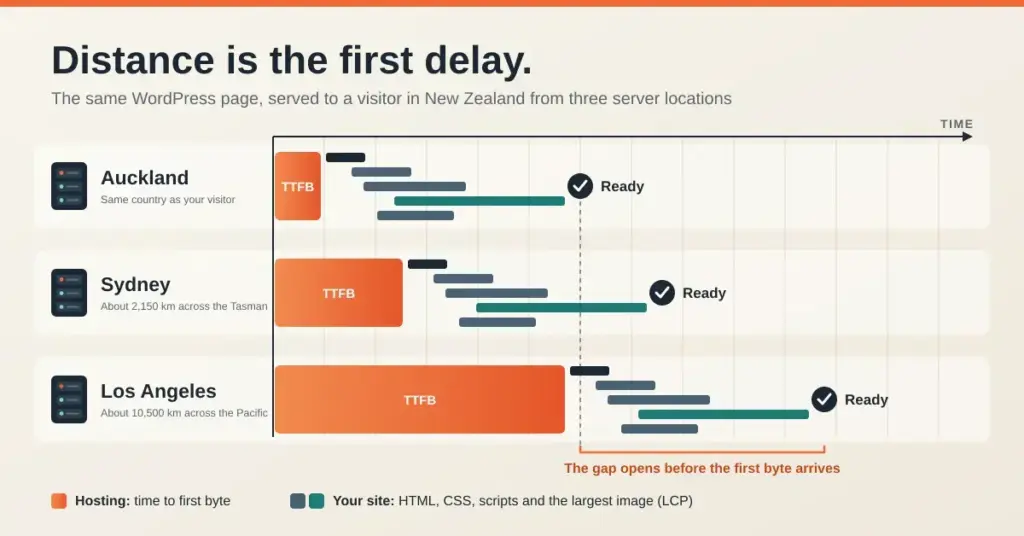
Time to First Byte (TTFB) measures how long your server takes to send back the very first piece of the page. It isn’t a Core Web Vital, but it sits in front of all of them: if the server takes a second to respond, that second is gone before anything can even begin to render.
What your host should support
Based on the official WordPress.org requirements (current as of 2026).
| Component | Recommended | Bare minimum (not advisable) |
|---|---|---|
| PHP | 8.3 or greater | 7.4 — end of life |
| Database | MariaDB 10.11+ or MySQL 8.0+ | MySQL 5.5.5 — end of life |
| Web server | Nginx, or Apache with mod_rewrite | Anything running PHP + MySQL |
| HTTPS | Required for every install | Required — no exceptions |
PHP 8.1 and earlier no longer receive security patches. PHP 8.2 receives security-only fixes until 31 December 2026. PHP 8.3, 8.4 and 8.5 are the current supported branches.
Here’s the part most hosting marketing leaves out: your host mainly controls TTFB. Your theme, plugins, images and third-party scripts control most of LCP, INP and CLS.
Excellent hosting will not rescue a site running four page builders and a dozen tracking scripts. What it does is remove the server from the list of problems, so the remaining issues become the ones you can actually fix.
Why server location matters for New Zealand visitors
Data travels through fibre at a finite speed, and no amount of hardware fixes raw distance. Every round trip from a visitor’s browser to your server and back has a minimum cost set purely by how far apart the two are.
The undersea cable leg between Auckland and Sydney adds roughly 11 milliseconds each way. Crossing the Pacific costs far more: the Southern Cross network quotes a round-trip delay of about 140 milliseconds between Australasia and the US West Coast. Real-world figures run higher again once routing, DNS lookups and network equipment are added.
For a New Zealand audience, that means a site hosted in Auckland starts with a genuine head start over one in Sydney — and a very large one over a server in Texas or Frankfurt — before a single line of code has run.
Local infrastructure has improved sharply in the last two years. Microsoft opened a New Zealand cloud region in late 2024, and AWS launched its Asia Pacific (New Zealand) Region on 2 September 2025, built around three availability zones in and around Auckland.
That’s useful context, but be careful about the assumption it invites.
Most budget shared WordPress plans sold to New Zealand customers do not run on those regions. Many still serve from Sydney, Singapore or the United States regardless of the .nz branding on the sales page.
The only reliable way to know is to ask the provider directly where the physical server for your plan sits, then test it yourself. The benefits of hosting locally in New Zealand only apply if the server is genuinely here.
The hardware and software behind a fast host
NVMe (Non-Volatile Memory Express) is a way of connecting solid-state drives directly to the processor, rather than through the older SATA interface designed back in the hard-drive era.
In practice, NVMe drives handle far more simultaneous read and write operations per second than SATA SSDs.
WordPress is unusually sensitive to this, because a single page view can trigger dozens of database queries plus file reads for themes and plugins. Fast storage stops those requests queuing behind one another when several visitors arrive at once.
Caching means storing a finished copy of a page so the server can hand it straight to the next visitor instead of rebuilding it from scratch. For most WordPress sites, this is the single largest speed improvement available.
Where the cache lives determines how fast it is:
| Web server | Typical caching approach | Relative efficiency |
|---|---|---|
| Apache | Plugin-based cache written in PHP | Lowest — PHP still has to start |
| Nginx | FastCGI cache handled by the server | High |
| LiteSpeed / OpenLiteSpeed | Built-in server-level cache (LSCache) | Highest for WordPress |
LiteSpeed’s advantage is that a cached page can be served without starting PHP at all, which cuts both response time and CPU use. Nginx with FastCGI caching, configured properly, gets close.
The gap between any two well-configured setups is usually much smaller than the gap between a cached site and an uncached one.
WordPress runs on PHP, and each new PHP release executes code faster than the last. Running an old version costs you speed and — more seriously — security patches.
The official WordPress.org requirements now list PHP 8.3 or greater, MariaDB 10.11+ or MySQL 8.0+, and HTTPS on every install. WordPress will still run on PHP 7.4 and MySQL 5.5.5, but both are long past end of life.
On the PHP side: version 8.1 and everything before it are end of life and no longer receive security patches. PHP 8.2 is in security-only support and reaches end of life on 31 December 2026. PHP 8.3, 8.4 and 8.5 are the current supported branches.
Speed targets at a glance
Measured from real visitors at the 75th percentile — meaning 3 out of 4 visits must hit the target for your site to pass.
| Metric | What it measures | “Good” target |
|---|---|---|
| LCP | Time for the main content to appear | 2.5 seconds or less |
| INP | Responsiveness to taps and clicks | 200 milliseconds or less |
| CLS | How much the layout jumps while loading | 0.1 or less |
| TTFB | Server response time (not a Core Web Vital) | 800 milliseconds or less |
Interaction to Next Paint (INP) replaced First Input Delay (FID) as a Core Web Vital on 12 March 2024.
Most hosts let you switch PHP versions yourself from the control panel in under a minute. If yours still defaults new installs to PHP 8.1, that tells you something about how closely they track the platform. Our guide to cPanel for New Zealand WordPress hosting shows where to find this setting.
Do you still need a CDN if you host in New Zealand?
A Content Delivery Network (CDN) stores copies of your files on servers around the world, so each visitor is served from somewhere physically close to them.
If nearly all your visitors are in New Zealand and your server is in Auckland, a CDN adds less than the marketing suggests — you’re already close to your audience.
A CDN earns its place when you have overseas visitors, when you want distributed protection against traffic floods, or when you want images and scripts served from infrastructure separate from your origin server.
One claim worth correcting: QUIC.cloud is not the only CDN able to cache dynamic WordPress HTML at the edge. It does this well and integrates tightly with LiteSpeed Cache, but Cloudflare’s Automatic Platform Optimization serves both static and dynamic WordPress content from Cloudflare’s network too, and several managed hosts run their own edge full-page caching. Choose based on what integrates cleanly with your stack, not on exclusivity claims.
What WooCommerce and other dynamic sites need
Online stores are harder to make fast, because carts, checkouts and account pages are different for every visitor and therefore can’t be served from an ordinary page cache.
This is where object caching matters. Tools like Redis keep the results of frequent database queries in the server’s memory, so repeated lookups don’t hit the database every time.
For a store, that speeds up exactly the pages page-caching can’t help with: cart updates, checkout steps and the admin dashboard.
If you’re running or planning a store, confirm your plan includes persistent object caching plus enough PHP memory and workers to handle concurrent checkouts. That’s a common dividing line between shared and managed WordPress hosting.
Security features that shouldn’t cost you speed
Server-level security tools generally cost less performance than plugin-based equivalents, because they filter traffic before it ever reaches PHP or your database.
A Web Application Firewall (WAF) blocks common attack patterns at the edge. Server-side malware scanning inspects files without a plugin eating into your site’s resources.
Modern encryption is now a speed feature as well as a security one: TLS 1.3 completes the initial secure handshake in fewer round trips than TLS 1.2, which is especially noticeable on high-latency connections. If you haven’t secured your site yet, see how to enable SSL on New Zealand WordPress hosting.
What the research on speed and conversions actually says
You’ll see the figure “a 100ms delay cuts conversions by 7%” quoted everywhere. It comes from Akamai’s 2017 State of Online Retail Performance report, based on roughly 10 billion user visits.
It’s a real finding, but it’s routinely misused. The 7% figure applies to mobile traffic specifically; desktop was materially lower, at around 2.4%. The effect was measured near the peak of the conversion curve, not as a constant rate that holds at any speed. The same report found that a two-second delay roughly doubled bounce rates.
The honest summary: faster sites reliably convert and retain better, the effect is real and worth investing in, and any single percentage applied to your specific site should be treated as an illustration rather than a forecast.
How to tell whether hosting is your bottleneck
Before you switch providers, find out whether the server is actually the problem.
Is it your hosting, or your site?
- Check TTFB separately from LCP. Field-data tools report both. A high one and a low one point at completely different problems.
- Test a cached page and an uncached one. If only uncached pages are slow, caching is the fix — not a new host.
- Confirm where the server actually is. Ask the provider directly. A .nz brand does not guarantee a New Zealand server.
- Check your PHP version in your control panel or under WordPress Site Health. Anything below 8.2 is unsupported.
- Deactivate plugins one at a time on a staging copy and re-test. Never test this on a live site.
- Compare mobile and desktop scores. Mobile is consistently harder to pass and is where most visitors are.
Rule of thumb: low TTFB + slow page = your site. High TTFB, even on a cached page = your host.
If your TTFB is comfortably under 800ms but your pages still feel slow, hosting is not your main issue — your theme, plugins or images are, and migrating won’t fix that.
If TTFB is consistently high, and stays high even on a cached page, the server or its location is worth addressing. Our guide to choosing WordPress hosting in New Zealand covers what to ask providers before you commit, and there’s a walkthrough of common WordPress hosting problems if you’d rather diagnose before you move.
This article is provided for factual and informational purposes only. It does not constitute professional, technical, security, legal or purchasing advice, and it is not a recommendation to buy any particular hosting product. Hosting features, pricing, infrastructure locations and software support dates change frequently — verify current details directly with the provider before making a decision. For authoritative software requirements, see the WordPress.org requirements page; for current performance-metric definitions, see Google’s Web Vitals documentation.
Reference sources
- WordPress.org — Requirements
- web.dev — Web Vitals
- web.dev — How the Core Web Vitals metric thresholds were defined
- web.dev — Interaction to Next Paint (INP)
- web.dev — Time to First Byte (TTFB)
- PHP — Supported Versions
- Cloudflare — Automatic Platform Optimization documentation
- AWS — Asia Pacific (New Zealand) Region launch (2 September 2025)
- Submarine Networks — Southern Cross Cable Network
- Akamai — State of Online Retail Performance report (2017)
Frequently asked questions
Does hosting in New Zealand actually make my site faster?
For New Zealand visitors, yes. The physical distance between visitor and server sets a floor on how fast any request can be, so an Auckland server has a real advantage over Sydney and a substantial one over servers in the United States or Europe. It won’t, however, fix slow themes, unoptimised images or heavy plugins.
What is a good Time to First Byte?
Google’s guidance treats 800 milliseconds or less as good, 800–1,800ms as needing improvement, and over 1,800ms as poor, measured at the 75th percentile of real visits. Faster is always better, but TTFB is not itself a Core Web Vital.
Which PHP version should my WordPress site run?
WordPress.org currently recommends PHP 8.3 or greater. PHP 8.1 and earlier are end of life with no security patches, and PHP 8.2 stops receiving them after 31 December 2026. Most hosts let you change versions from the control panel in under a minute.
Is LiteSpeed really faster than Nginx or Apache for WordPress?
LiteSpeed’s built-in cache can serve a stored page without starting PHP at all, which gives it an edge over Apache running a PHP-based caching plugin. Nginx with FastCGI caching performs comparably when it’s configured well. In practice, the gap between any cached setup and an uncached one is far larger than the gap between these servers.
What’s the difference between page caching and object caching?
Page caching stores the finished HTML of a page and reuses it for the next visitor. Object caching stores the results of individual database queries in memory. Page caching helps blogs and brochure sites the most, while object caching is what speeds up carts, checkouts and admin pages that can’t be page-cached.
Do I need a CDN if all my visitors are in New Zealand?
Not for speed alone, if your server is already in New Zealand. A CDN becomes useful when you have overseas visitors, want distributed protection against traffic floods, or want to offload static files from your origin server.
How do I check whether my hosting or my site is slowing things down?
Run your site through a field-data tool such as PageSpeed Insights and read TTFB separately from LCP. A low TTFB with poor LCP points at your theme, images or plugins. A consistently high TTFB, especially on a cached page, points at the server or its location.