1st Domains is a domain registration service widely used in New Zealand for managing web addresses, along with basic hosting and email. Whether you are setting up a personal blog or looking after domains for a business, understanding how registration, transfers, renewals, and management work helps you avoid the common pitfalls — an accidental expiry, a stalled transfer, or a misconfigured DNS record.
This guide walks through each of those tasks in plain English.
Registering a domain name
Registration starts by searching for your preferred name to check whether it is available across top-level domains such as .nz, .co.nz, .com, or .org. If it is free, you complete the process by supplying accurate contact details and choosing a registration term, typically between one and ten years.
You are asked to provide registrant, admin, and technical contact details. These do not have to be the same person, but they must be valid and current. New Zealand domains like .co.nz are governed by rules set through InternetNZ and must meet local policy standards. If you want to secure several name variations at once — a sensible way to protect a brand — a bulk registration tool lets you do that in one go. Our guide to buying domain extensions in NZ covers choosing the right one.
Transferring a domain to 1st Domains
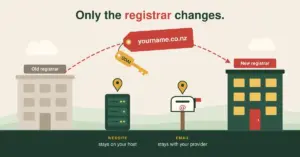
Moving a domain in is straightforward with a little preparation. Unlock the domain at your current registrar and obtain its transfer code, then start the transfer at the new registrar by supplying the domain and that code. An approval email goes to the domain’s contact address, and the transfer usually completes within one to five business days.
The type of code depends on the domain. Most global domains (like .com) use an EPP code, while .nz domains use an Authorisation Code (formerly called a UDAI), valid for 30 days. Make sure your WHOIS contact email is current, since the confirmation is sent there, and check your nameserver settings before and after so nothing drops offline. Our guide to transferring domain names explains the process in more detail.
Renewing a domain — and what happens if it lapses
Renewals can be manual or automatic. Automatic renewal is enabled by default for most accounts and is the simplest way to avoid an accidental expiry. You will usually receive reminders before the renewal date. To renew manually, log in, find the domain in your dashboard, and choose a term — renewing several years at once further reduces the risk of losing it.
Knowing the lifecycle after expiry is important, because a lapsed domain does not disappear immediately.
The domain lifecycle after expiry
1. Active
Registered and working. Renew any time before expiry.
2. Grace period
Just expired — usually still renewable at the normal price.
3. Redemption (gTLDs)
Domain stops working; recoverable, but usually with an extra fee. .nz follows its own DNC rules.
4. Released
If still not renewed, the name is released for anyone to register.
Bottom line: renew on time — don’t rely on recovering a lapsed domain.
After a domain expires and passes any grace period, many domain types enter a redemption phase during which the domain stops working but can still be recovered — usually for an additional fee, because it requires registry intervention. The exact timeframes and costs vary by extension, and .nz domains follow their own rules set by the Domain Name Commission rather than the redemption process used for global domains. The practical lesson is the same either way: renew on time, and do not rely on recovering a domain after it lapses.
Managing your domain
Once registered, a domain is managed through the control panel, where you can edit contact details, update nameservers, configure DNS records, and toggle the transfer lock. For .nz domains, privacy settings let you hide some contact information from public WHOIS view, though certain details remain visible under New Zealand domain policy.
Nameserver and DNS changes typically take 24 to 48 hours to propagate fully, so if you are switching hosts or updating DNS zones, plan the change with enough lead time to avoid disruption.
What you can manage from the control panel
- ✓ Edit registrant, admin, and technical contact details
- ✓ Update nameservers when switching hosts
- ✓ Add or edit DNS records (A, CNAME, TXT, MX)
- ✓ Lock or unlock the domain for transfers
- ✓ Turn on domain privacy where supported (.nz)
- ✓ Manage renewals and auto-renew settings
Allow 24–48 hours for nameserver and DNS changes to propagate fully.
Web and email hosting options
1st Domains offers basic web hosting aimed at simple sites — static HTML pages, light CMS installs, and file uploads through a web-based manager. It suits domain parking, low-traffic sites, or temporary landing pages. For anything more demanding, such as a full WordPress environment or higher traffic, you would point your 1st Domains-registered domain at dedicated hosting through DNS. Our main WordPress hosting NZ hub covers those options.
Email hosting lets you create custom addresses at your domain, with webmail, forwarding, and spam filtering — enough for individuals or small teams wanting a professional address. MX records are managed in the same control panel, so you can also route mail to an external service like Google Workspace or Microsoft 365 using custom MX records.
This article is general information about domain registration and management, not specific technical or legal advice. Provider features and domain policies change, so confirm current details with 1st Domains and the relevant registry before acting.
Reference sources
Frequently asked questions
How do I set up email forwarding from 1st Domains?
Log in, go to the Email section, and choose your domain. Select the option to add a forwarding address, enter the custom address you want to use, and specify where mail should be delivered. Changes usually take effect within about 30 minutes.
Does 1st Domains offer a reseller plan?
There is no public reseller program, but if you manage multiple domains you can keep them all under a single login. Bulk tools and dashboard features help you register, renew, and update many domains efficiently from one account.
How do I change the owner or registrant of a domain?
In your domain settings, choose the option to edit registrant details and provide the new owner’s information. Some changes, particularly for .nz domains, may require verification by email or a new Authorisation Code, as a safeguard against unauthorised transfers of ownership.
How do I configure custom DNS records?
Open the DNS Manager in your dashboard, where you can add or edit A, CNAME, TXT, and MX records. Changes usually begin propagating within about 30 minutes, though full updates can take up to 48 hours depending on the record’s TTL setting.
What is the difference between an EPP code and a UDAI?
Both authorise a domain transfer, but they apply to different domains. Global domains such as .com use an EPP code, while .nz domains use an Authorisation Code (formerly called a UDAI). Your current registrar must provide the correct code on request when you transfer away.
How long does a domain transfer take?
Usually one to five business days, once you have supplied the transfer code and approved the confirmation email. Keeping your WHOIS contact email current is important, because the approval request is sent there — a stale address is the most common cause of a stalled transfer.