Most advice about “New Zealand website design” is generic advice with suburb names sprinkled through it. Good navigation, legible type and fast loading are good everywhere; they aren’t a local specialism.
There are things that genuinely differ for a New Zealand business, though, and they’re mostly not aesthetic. They’re the consumer law your pricing has to satisfy, the accessibility standard that applies if you sell to government, the trust signals Kiwi buyers can actually verify, and the performance targets Google measures. This guide covers those.
The consumer law your website has to satisfy
This is the part most design briefs skip entirely, and it’s enforceable.
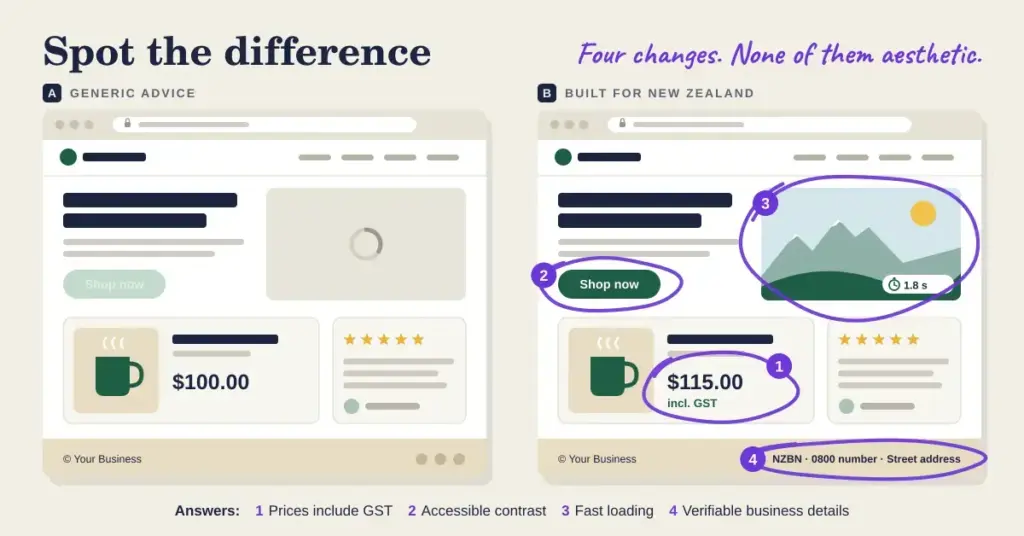
Prices must include GST or be clear about it. The Commerce Commission is explicit: any claims about price must be clear, accurate and unambiguous, prices must include or be clear about the 15% GST, and any surcharges must be declared before purchase. Displaying a GST-exclusive price to consumers without making that obvious is a Fair Trading Act problem, and a disclaimer in small print doesn’t fix a headline figure that misleads.
The practical design implication: if you’re B2C, show GST-inclusive prices. If you’re B2B and quote excluding GST, label it unmistakably at the point the price appears — not in a footnote.
Claims need evidence behind them. The Fair Trading Act prohibits unsubstantiated representations. “New Zealand’s leading”, “30% faster”, “award-winning” all need reasonable grounds at the time you make them. If your designer writes marketing copy, someone needs to check it’s defensible.
Omission counts. Neglecting to mention that a price excludes GST, or that a mandatory fee applies, can itself be misleading conduct.
It applies online. The Act covers all traders, including online and overseas businesses selling into New Zealand.
Fair Trading Act: what your website has to get right
Applies to all traders, including online and overseas businesses selling into New Zealand.
| Requirement | What it means in practice |
|---|---|
| GST clarity | Prices must include or be clear about the 15% GST. Show inclusive prices to consumers; label exclusive prices unmistakably. |
| Surcharges declared | Any additional fee must be disclosed before purchase, not revealed at checkout. |
| Substantiated claims | “Leading”, “fastest”, “30% better” need reasonable grounds at the time you publish them. |
| No misleading omissions | Leaving out a mandatory cost or a material condition can itself be misleading. |
| Accurate credentials | Only display awards, memberships and certifications you currently hold. |
A disclaimer in fine print does not fix a headline price that misleads.
Accessibility: who must, and who should
This is the second thing the design cluster misses, and the position is more nuanced than either “it’s the law” or “it doesn’t apply to us.”
The Web Accessibility Standard 1.2 requires conformance to WCAG 2.2 at Level AA, and has applied since 17 March 2025. Under Cabinet Minute (03) 41/2B it directs every Public Service department, the New Zealand Police, the New Zealand Defence Force, the Parliamentary Counsel Office and the NZSIS to implement it, across both publicly facing and internally facing pages. Other public-sector and local-government bodies aren’t required to, but are encouraged to.
Private businesses are not legally required to comply with that Standard. Anyone telling you otherwise is overstating it.
But the Human Rights Act 1993 prohibits discrimination on the grounds of disability, and it applies to private entities as well as government. It predates the web and doesn’t name WCAG, but the obligation not to discriminate doesn’t stop at the browser.
Two practical consequences follow.
If you sell to government agencies, accessibility will come up. Mandated agencies procuring web products and services are expected to require accessibility of what they buy. A supplier who can’t speak to WCAG conformance is at a disadvantage in that market.
Accessible design is mostly just good design. Sufficient colour contrast, keyboard navigation, real text instead of text-in-images, descriptive alt text, form labels, captions on video. Every one of those helps people using the site on a phone in bright sunlight, on a poor connection, or in a hurry. Very little of it costs more if it’s in the brief from the start; retrofitting it later is where the cost sits.
Performance is a design decision, not a hosting problem
Design choices set the ceiling on your page speed before hosting gets involved. A hero video, four webfont weights, unsized images and an auto-rotating carousel will produce a slow site on excellent infrastructure.
Google measures real-world page experience through three Core Web Vitals, and it’s worth having the current ones right.
The numbers your design has to hit
Measured from real visitors at the 75th percentile.
| Metric | Good | Design choices that break it |
|---|---|---|
| LCP Loading | ≤ 2.5 seconds | Oversized hero images, sliders, render-blocking fonts |
| INP Responsiveness | ≤ 200 milliseconds | Heavy JavaScript, chat widgets, tracking scripts |
| CLS Visual stability | ≤ 0.1 | Unsized images, font swaps, injected banners |
| TTFB Server response | ≤ 0.8 seconds | Mostly hosting and caching, not design |
Check your brief: INP replaced First Input Delay in March 2024. A proposal still specifying FID hasn’t been updated in two years.
Note the responsiveness metric especially. First Input Delay was retired in March 2024 and replaced by Interaction to Next Paint. Any brief, audit or agency proposal still listing FID is working from pre-2024 material — a quick way to gauge how current your supplier is.
The design decisions that most often break these:
LCP — oversized hero images, render-blocking fonts and scripts, sliders.
INP — heavy JavaScript, chat widgets, tracking scripts firing on interaction.
CLS — images and ads without declared dimensions, fonts that swap and reflow, banners injected above existing content.
Server response time sits underneath all of it. Google treats a TTFB of 0.8 seconds or less as good and over 1.8 seconds as poor. That part is largely determined by your hosting and caching rather than your design, and our guide to site speed covers it.
Trust signals New Zealanders can actually verify
Generic “trust badges” do very little. Signals that can be checked do much more.
Your NZBN. Publicly verifiable against the NZBN Register, which covers sole traders and partnerships as well as companies.
A physical address. Even a suburb and region if you work from home. “Auckland-based” with no further detail reads as evasive.
Named people with real photos. A team page with actual names beats stock imagery of a generic office by a wide margin.
Genuine local proof. Project photos and case studies from identifiable places. A builder’s work in Karori is more persuasive to a Karori homeowner than a testimonial with no location attached.
Relevant certifications — Master Builders, an electrical registration, a professional body membership — where you actually hold them.
One caution that follows from the consumer law section: displaying a certification, award or membership you don’t currently hold is a false representation, not a design flourish.
What a website costs in New Zealand
What a website costs in New Zealand
2026 published ranges, excluding GST. Compare scope, not headline price.
| Route | Typical cost | Hidden cost |
|---|---|---|
| DIY builder | $20 – 50 / month | Your own hours — count them |
| Freelancer | NZ$1,500 – 5,000 | Single point of failure for support |
| Agency | NZ$5,000 – 15,000+ | Ask who actually does the work |
| Biggest variable | How much copy and photography you supply. Content is the slowest part of most builds. | |
The variable that moves these numbers most isn’t page count. It’s how much of the content you supply. Copy, photography and product data are the slowest parts of most builds, and supplying them yourself reliably reduces the quote.
Where design and infrastructure meet
Three decisions get made at design time and are expensive to reverse.
The platform. A closed builder is faster to launch and harder to leave; self-hosted WordPress is the opposite. Our guide to choosing a website builder covers that trade-off.
The URL structure. Sensible, readable paths cost nothing to set up and are painful to change once pages have earned links.
Whether you own the assets. Make sure the finished site, its files and its content belong to you, and that you can access the hosting and domain accounts without going through your designer.
This article is provided for factual and informational purposes only. It does not constitute legal or professional advice. The Fair Trading Act and accessibility material here is general information about published requirements, not advice on your circumstances — obligations depend on what you sell and to whom. Seek advice from a qualified lawyer before relying on it, and check current requirements with the Commerce Commission, Consumer Protection and the NZ Government web standards.
Reference sources
- Commerce Commission — Pricing and GST requirements
- Commerce Commission — Pricing your products or services
- Consumer Protection — Misleading prices or advertising
- Consumer Protection — Fair Trading Act
- NZ Digital Government — Web Accessibility Standard 1.2
- NZ Digital Government — About the Web Accessibility Standard 1.2
- Human Rights Commission — Disability discrimination
- web.dev — Core Web Vitals
- web.dev — Time to First Byte
- Horton Taylor — Website costs in New Zealand
- YuNet — Auckland website cost guide
Frequently asked questions
Do I have to show GST-inclusive prices on my website?
The Commerce Commission states prices must include or be clear about the 15% GST, and surcharges must be declared before purchase. For consumer-facing sites, GST-inclusive display is the safe approach. If you quote excluding GST for business customers, label it clearly at the point the price appears — fine print doesn’t rescue a misleading headline figure.
Does my business legally have to meet web accessibility standards?
The Web Accessibility Standard 1.2, which requires WCAG 2.2 Level AA and has applied since 17 March 2025, directs Public Service departments, NZ Police, NZDF, the Parliamentary Counsel Office and NZSIS. Private businesses aren’t required to meet that Standard. The Human Rights Act 1993’s prohibition on disability discrimination does apply to private entities, and accessibility comes up in government procurement.
What are the current Core Web Vitals targets?
Largest Contentful Paint of 2.5 seconds or less, Interaction to Next Paint of 200 milliseconds or less, and Cumulative Layout Shift of 0.1 or less, each at the 75th percentile of real visits. Note that INP replaced First Input Delay in March 2024 — proposals still referencing FID are out of date.
What does a website cost in New Zealand?
Excluding GST: roughly $20–50 a month for a DIY builder plus your time, NZ$1,500–5,000 for a freelancer build, and NZ$5,000–15,000 or more for agency work. The biggest cost variable is how much copy and photography you supply yourself.
Is there really such a thing as “Kiwi” web design?
Not aesthetically — good design principles are universal. What genuinely differs here is compliance (GST pricing display, substantiated claims), the accessibility standard if you deal with government, verifiable local trust signals like your NZBN, and writing in New Zealand English.
What trust signals actually work on a New Zealand site?
Ones that can be checked: your NZBN, a real physical location, named people with genuine photos, project work from identifiable places, and certifications you actually hold. Displaying credentials you don’t hold is a false representation under the Fair Trading Act.
Who should own my website when it’s finished?
You should — the files, the content, and access to the hosting and domain accounts. Agree this in writing before the build starts. It’s straightforward to arrange at the outset and awkward to negotiate after a relationship ends.