Moving a WordPress site to a New Zealand host sounds daunting, but it is a well-worn path, and most of the work can be done for you. Whether you are chasing lower latency for Kiwi visitors, local support, or NZD billing, this guide covers how to migrate cleanly — and how to transfer your .nz domain correctly, which is where a lot of misinformation circulates.
Two things people mean by “migration”
It helps to separate two jobs that often happen together but are not the same.
The first is moving your website — the WordPress files and database — from your old host to your new one. The second is transferring your domain name to a new registrar. You can do one without the other: your domain can stay where it is registered while your site moves hosts, because the domain simply points at wherever your site lives. We will cover both.
Before you migrate: prepare
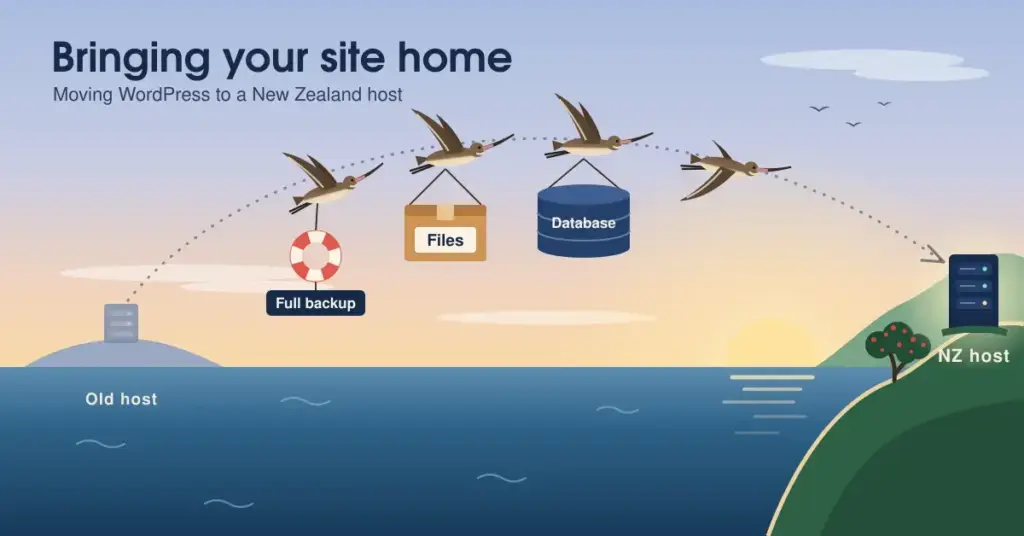
Start with a full backup of your existing site — files and database. This is your safety net, and you should never migrate without one.
Check that your new host meets WordPress’s current requirements (PHP 8.3 or newer, a MySQL 8.0+ or MariaDB 10.6+ database, and HTTPS), and set up your new hosting account ready to receive the site. If you have not chosen a host yet, our main WordPress hosting NZ hub can help.
Migrating your WordPress site
There are three ways to do this, from easiest to most hands-on.
The simplest is to let your new host migrate it for you. Most quality NZ hosts offer free assisted migration — you provide access to your old site and they move it, often with little or no downtime. If that is available, use it.
The second option is a migration plugin. Several reputable plugins package up your entire site and restore it on the new host with a few clicks. This is a good middle path if you want to do it yourself without touching files directly.
The third is a manual migration: copy the WordPress files across via FTP or SFTP, export the database from the old host and import it to the new one, then update the site’s configuration to point at the new database. It gives you full control but requires more care.
Three ways to migrate — easiest first
1. Host-assisted migration (recommended)
Give your new host access; they move the site for you, often free and with little downtime.
2. Migration plugin
A reputable plugin packages your whole site and restores it on the new host in a few clicks.
3. Manual migration
Copy files via FTP/SFTP, export & import the database, then update the site config. Full control, more care needed.
Golden rule: keep the old site live until the new one is fully tested — only then switch over.
Whichever route you take, the golden rule is to keep the old site live until the new one is fully working and tested. Only then do you switch over.
Transferring your .nz domain (optional)
If you also want to move your domain to a new registrar, here is where accuracy matters — there is a persistent myth about .nz transfer timing.
You can transfer a .nz domain to another registrar at any time, except during the first five days after it is registered (the registration grace period). There is no 60-day lock — that is a rule from other domain types, not .nz. To transfer, you request an Authorisation Code (previously called a UDAI) from your current registrar, then give it to your new one.
.nz domain transfer: the facts
| When you can transfer | Any time except the first 5 days after registration |
| Is there a 60-day lock? | No — that’s a rule for other domain types, not .nz |
| What you need | An Authorisation Code (formerly “UDAI”) from your current registrar |
| Code validity | 30 days from generation; used once |
| Does it move my website? | No — domain transfer and site migration are separate jobs |
Never share your Authorisation Code with anyone except your new registrar — it’s the key to your domain.
Transferring your domain does not move your website, and it does not have to interrupt your site if your hosting is set up correctly. For a fuller walk-through, see our guide to transferring domain names.
After migrating: check everything works
Before switching over for good, test the new site thoroughly. Click through your pages, check images and links load, test any forms or checkout, and confirm SSL is active (the padlock shows). If you moved the domain or changed where it points, allow time for the change to propagate across the internet — usually a few hours.
Once you are satisfied, update your domain to point at the new host, keep the old site as a backup for a little while, and you are done. Our guides on security and fixing common issues help you settle in.
A note on data and compliance
If your site holds customer information, the Privacy Act 2020 applies to how you handle it — including keeping it secure through a migration. Note that no New Zealand law requires you to host data locally; moving to an NZ host can simplify compliance and reduce latency, but it is a practical choice, not a legal obligation.
This article is general information to help you plan a migration, not specific technical or legal advice. Hosts and control panels differ, and steps change over time — follow your host’s own migration guidance, back up first, and seek professional help for complex moves.
Reference sources
Frequently asked questions
Will migrating my site cause downtime?
It does not have to. If you keep your old site live until the new one is built and tested, then switch over, visitors see no interruption. Assisted migration from your new host is the smoothest route and is designed to minimise or avoid downtime entirely.
Do I have to transfer my domain to move hosts?
No. Your domain and your hosting are separate. You can move your website to a new host while leaving your domain registered where it is — you simply update the domain to point at the new host. Transferring the domain is optional and can be done separately.
How long does a .nz domain transfer take, and are there restrictions?
You can transfer a .nz domain at any time except during the first five days after registration. There is no 60-day lock. You will need an Authorisation Code (formerly called a UDAI) from your current registrar, which is valid for 30 days. The transfer itself is usually quick once initiated.
What is an Authorisation Code (UDAI)?
It is a secure code that authorises the transfer of your .nz domain from one registrar to another — the “key” to your domain. Your current registrar must provide it on request. Never share it with anyone except your new registrar for the purpose of transferring, as it controls ownership of the domain.
Can I migrate WordPress myself, or do I need help?
Either. Many hosts migrate your site for you at no charge, which is the easiest option. If you prefer to do it yourself, a reputable migration plugin handles most of the work. A fully manual migration is possible too, but it requires comfort with files and databases.
What should I check after migrating?
Test your pages, images, links, and any forms or checkout; confirm SSL is active; and if you changed where your domain points, allow a few hours for the change to take effect. Keep the old site as a backup until you are confident the new one is working perfectly.