WordPress powers a huge share of the web, which makes it a constant target for automated attacks. The good news is that most break-ins exploit a handful of avoidable weaknesses — outdated software, weak logins, no backups. Close those, and you have dealt with the overwhelming majority of the risk.
This guide is a practical, plain-English checklist for New Zealand site owners. Work through it once, keep a few habits going, and your site will be far harder to compromise than most.
Keep everything updated
The single most important habit. Most successful WordPress hacks target known weaknesses in outdated core software, themes, or plugins — problems that were already fixed in an update the site never installed.
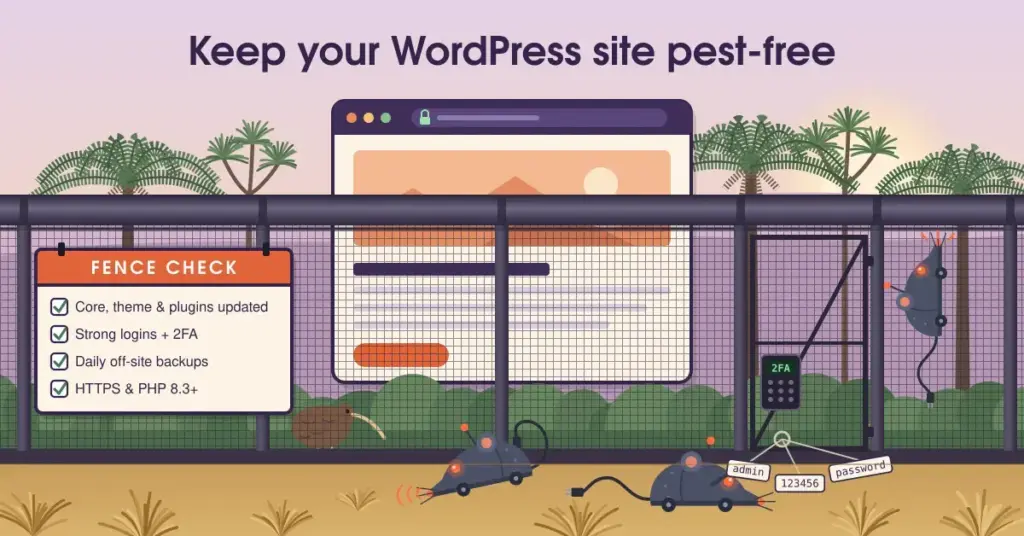
Keep WordPress core, your theme, and every plugin current. Make sure your host runs modern software too: WordPress 7.0 (May 2026) expects PHP 8.3 or newer, a MySQL 8.0+ or MariaDB 10.6+ database, and HTTPS. A host still defaulting to old PHP is a warning sign. Managed hosting handles much of this for you — see our managed WordPress hosting guide.
Use strong logins and two-factor authentication
Weak or reused passwords are how many sites fall. Use a long, unique password for every admin account, stored in a password manager.
Then add two-factor authentication (2FA), which asks for a code from your phone as well as your password. It is the highest-value security step after updates: enabling 2FA blocks the overwhelming majority of automated account-takeover attempts, because a stolen password alone is no longer enough to get in.
Limit who can get in
The fewer doors, the fewer ways in.
Give each person the lowest level of access they need to do their job — not everyone needs to be an administrator. Remove accounts for people who have left, and delete any default or unused accounts.
Avoid the obvious “admin” username, and use a plugin or host feature to limit failed login attempts, which stops bots guessing passwords endlessly. Some hosts also let you restrict admin access to specific locations.
Secure the connection with SSL/HTTPS
Every site needs HTTPS, which encrypts the data moving between your visitors and your server. It is required by modern WordPress, expected by Google, and a valid certificate is free via Let’s Encrypt on any reputable host.
If you are not sure yours is set up correctly, our guides on what SSL is and enabling SSL on NZ WordPress hosting walk through it.
Install a security plugin and firewall
A reputable security plugin adds several protections at once — a web application firewall to block malicious traffic before it reaches WordPress, malware scanning, and login hardening. Well-regarded options include Wordfence, Solid Security, and Sucuri. Pick one; you do not need several, and running multiple can cause conflicts.
Back up regularly — and off-site
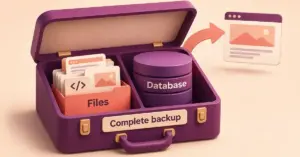
Backups are your safety net when prevention fails. Run automatic, regular backups and keep at least one copy off-site, separate from your host. If your site is ever compromised, a clean, recent backup is often the fastest way back.
WordPress security checklist
- ✓ Keep core, theme, and all plugins updated
- ✓ Run current server software (PHP 8.3+, HTTPS)
- ✓ Use long, unique passwords in a password manager
- ✓ Turn on two-factor authentication (2FA)
- ✓ Give each user only the access they need
- ✓ Limit failed login attempts; avoid the “admin” username
- ✓ Install one reputable security plugin with a firewall
- ✓ Run automatic backups, with a copy kept off-site
- ✓ Remove unused plugins, themes, and accounts
Choose a secure host
Your host is your site’s foundation. A good one keeps server software current, runs its own firewalls and monitoring, isolates sites from each other, and backs data up. This is a real advantage of quality managed hosting, and a reason to be wary of the very cheapest plans. For New Zealand-specific cyber guidance aimed at small businesses, the government’s Own Your Online platform (run by the NCSC) is a genuinely useful, free resource.
What to do if your site is hacked
Even careful sites can be compromised. Acting quickly limits the damage.
If your site is hacked: first steps
- Put the site into maintenance mode so visitors aren’t exposed to a compromised page.
- Change every password — WordPress admin, hosting, database, and FTP.
- Scan for malware with your security plugin or your host’s tools.
- Restore from a clean, recent backup taken before the compromise.
- Update everything — core, theme, plugins, and PHP — and remove anything unused.
- Work out how they got in and close that gap so it doesn’t recur.
- Report & notify: tell the NCSC (0800 114 115), and if customer data may be affected, follow your Privacy Act breach-notification duties.
If customer data may have been exposed, remember your Privacy Act 2020 duty to notify the Privacy Commissioner and affected people of any breach that could cause serious harm. In New Zealand you can also report the incident to the NCSC on 0800 114 115. Our guide to fixing common hosting issues covers related recovery steps, and the main WordPress hosting NZ hub links to the rest.
This article is general information to help you improve your site’s security, not specific security or legal advice. Threats and best practices change, and serious incidents may need professional help — seek specialist advice where the stakes are high.
Reference sources
Frequently asked questions
What is the most important thing I can do to secure WordPress?
Keep everything updated. Most successful attacks exploit known weaknesses in outdated core software, themes, or plugins that a later update already fixed. Combine regular updates with strong passwords and two-factor authentication and you have addressed the bulk of the risk.
Do I really need a security plugin?
A reputable one is well worth it, because it bundles a firewall, malware scanning, and login protection in a single tool. Choose just one well-regarded plugin, though — running several at once can cause conflicts and slow your site down without adding real protection.
Is two-factor authentication worth the hassle?
Yes. It is one of the highest-value steps you can take: with 2FA enabled, a stolen password alone is not enough to log in, which blocks the overwhelming majority of automated account-takeover attempts. The minor inconvenience is a small price for the protection.
How often should I back up my WordPress site?
Regularly, and automatically — daily suits most active sites, less often for sites that rarely change. The key is keeping at least one recent copy off-site, separate from your host, so you can recover quickly if something goes wrong.
What should I do first if my site is hacked?
Put the site into maintenance mode, change all passwords, and scan for malware. Then restore from a clean, recent backup, update everything, and review how the attacker got in so you can close the gap. If customer data may be affected, follow your Privacy Act notification duties.
Does secure hosting really make a difference?
Yes. A good host keeps server software current, runs firewalls and monitoring, isolates sites from one another, and backs data up — protections you would otherwise arrange yourself. It is one reason quality managed hosting is worth considering, and why the very cheapest plans can be a false economy.
Where can I get trustworthy security help in New Zealand?
The government’s Own Your Online platform, run by the NCSC, offers free, plain-English guidance for small businesses and individuals. For reporting a cyber security incident, contact the NCSC on 0800 114 115.