“Shared”, “VPS”, “managed”, “dedicated” — hosting plans come with a wall of labels, and providers rarely stop to explain them. Pick the wrong one and you either overpay for power you never use, or throttle a growing site on a plan that cannot keep up.
This guide walks through the main WordPress hosting plan types available in New Zealand, in plain English: what each one is, who it suits, and roughly what it costs in 2026. By the end you should know exactly which type to start with.
First, a useful distinction
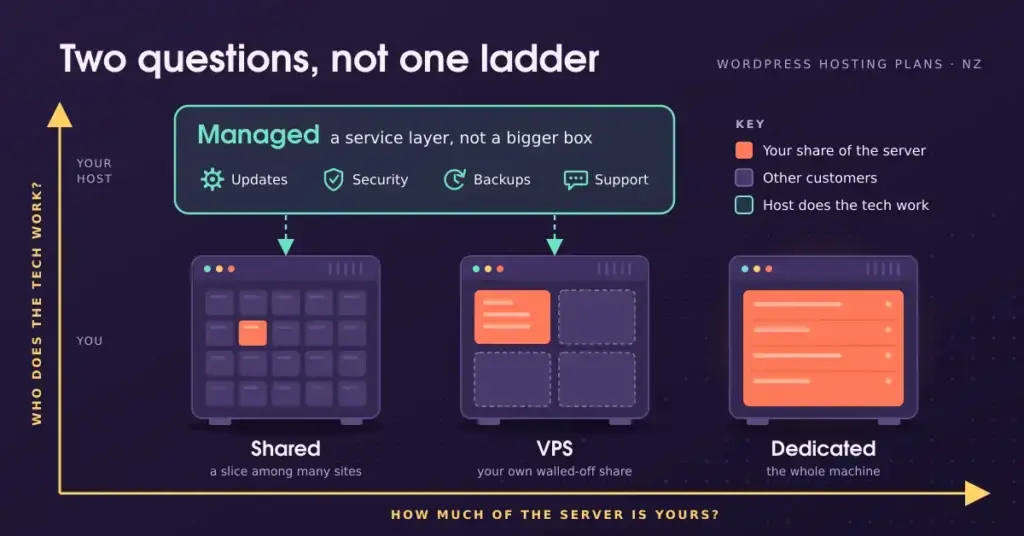
Most guides list four plan “levels” as if they were a straight ladder. It is clearer to see them as two different questions.
The first is how much of the server is yours — this runs from shared, to VPS, to dedicated. The second is who does the technical work — and that is what “managed” means. Managed WordPress hosting is a service layer that can sit on top of shared or cloud infrastructure; it is not simply “a bigger box”. Keep that in mind as we go, because it is where a lot of confusion comes from.
Shared hosting: a room in a shared flat
Shared hosting is the entry level. Your site sits on one server alongside many others, and everyone draws from the same pool of processor, memory, and storage.
Like flatting, it is affordable because the cost is split many ways. The trade-off is that a noisy neighbour — another site having a traffic surge — can slow yours down, and you get little control over server settings.
Personal blogs, portfolios, and small brochure sites with modest, steady traffic. It is the sensible, low-cost place to begin, and you can move up later.
VPS hosting: your own apartment
A Virtual Private Server takes one physical machine and divides it into separate virtual compartments using software called a hypervisor. You get a guaranteed slice of processor, memory, and storage that is yours alone, plus far more control — including root access to install what you like.
Think of it as owning an apartment rather than renting a room: you are still in the same building, but your space and utilities are your own. A neighbour’s traffic spike no longer affects you.
Growing sites that have outgrown shared hosting, and developers who need control over the server environment. It is a step up in both capability and responsibility.
Managed WordPress hosting: a serviced apartment
Managed WordPress hosting is the hands-off option. The host tunes the environment specifically for WordPress and takes care of the technical upkeep for you — automatic core and plugin updates, daily backups, security monitoring, and server-side caching.
It is the serviced-apartment model: you enjoy the space while someone else handles the maintenance. Because WordPress runs the latest version best (WordPress 7.0 arrived in May 2026 and expects PHP 8.3 or newer, MySQL 8.0+ or MariaDB 10.6+, and HTTPS), having a host keep those pieces current is genuinely valuable. Our managed WordPress hosting guide goes deeper on what to expect.
Businesses, online stores, and anyone whose site matters to their income and who would rather not think about updates, security, and backups.
Dedicated hosting: a standalone house
Dedicated hosting gives you an entire physical server to yourself — all of its resources, no neighbours. It offers the most power, control, and isolation, at the highest price, and it is generally only necessary for large organisations with heavy, sustained traffic or specialised technical needs.
High-traffic enterprises, or sites with unusual hardware or compliance requirements. Most New Zealand websites never need it.
The four plan types side by side
| Type | The analogy | Control | Typical NZ cost/mo | Best for |
|---|---|---|---|---|
| Shared | Room in a flat | Low | ~NZ$5–$35 | Blogs, portfolios, small sites |
| VPS | Your own apartment | High (root access) | ~NZ$30–$150+ | Growing sites, developers |
| Managed WordPress | Serviced apartment | Host does the work | ~NZ$35–$105 | Stores, business sites |
| Dedicated | Standalone house | Total | ~NZ$150+ | High-traffic enterprise |
Remember: “managed” is a level of service, not a size of server — it can run on shared or cloud infrastructure. Costs are rough 2026 guide bands; confirm current pricing before you buy.
What the plans cost in New Zealand
Prices vary by provider and move around, so treat these as rough 2026 guide bands, not quotes:
Shared hosting from NZ providers typically runs about NZ$5 to NZ$35 a month. VPS plans generally start around NZ$30 and climb to NZ$150 or more depending on resources. Managed WordPress hosting usually sits around NZ$35 to NZ$105 a month, reflecting the service bundled in. Dedicated servers start from roughly NZ$150 a month and rise steeply from there.
A .nz or .co.nz domain adds about NZ$20 to NZ$40 a year, and a valid SSL certificate should be free via Let’s Encrypt on any reputable plan. If keeping costs down is the priority, our guide to cheap WordPress hosting in NZ covers getting value without cutting corners.
Which plan should you start with?
For most people launching a new site, the honest answer is: start smaller than you think you need. Shared or managed WordPress hosting covers the vast majority of New Zealand websites, and upgrading later is routine.
A sensible upgrade path
Most NZ sites travel this route — start low, move up only when your site tells you it’s time.
1. Start
Shared or managed WordPress hosting for a new site.
2. Grow
Traffic rising or store getting busy? Move to (or size up) managed hosting.
3. Scale
Heavy, sustained load or special needs? Step up to a VPS or dedicated server.
Upgrading is routine and most hosts will migrate your site for you — so there’s no need to overbuy on day one.
If you are weighing the two most common choices specifically, our shared vs WordPress hosting comparison breaks that decision down further. And the main WordPress hosting NZ hub links to everything else — installing, securing, and migrating your site.
This article is general information to help you compare hosting plan types, not specific technical or purchasing advice. Prices, plans, and software requirements change often — confirm the current details with the provider before you buy.
Reference sources
Frequently asked questions
What is the difference between shared and VPS hosting?
On shared hosting you share a server’s resources with many other sites. On a VPS, the server is partitioned so you get a guaranteed slice of processor and memory that is yours alone, plus more control. VPS costs more but is faster and more consistent under load.
Is managed WordPress hosting a “type” of server?
Not exactly. Managed WordPress hosting describes a level of service — the host handling updates, backups, security, and caching for you — rather than a size of server. It can run on shared or cloud infrastructure. The label tells you who does the work, not how big the box is.
Do I need a VPS or dedicated server for a small business site?
Usually not. Most small business sites run perfectly well on shared or managed WordPress hosting. VPS and dedicated plans are for high traffic, resource-heavy applications, or specialised technical needs. Paying for them before you need them is money wasted.
How much should I budget for WordPress hosting in NZ?
As a rough 2026 guide: shared hosting around NZ$5 to NZ$35 a month, managed WordPress about NZ$35 to NZ$105, VPS from roughly NZ$30 upward, and dedicated servers from around NZ$150. Add roughly NZ$20 to NZ$40 a year for a .nz domain.
Can I upgrade from one plan type to another later?
Yes, and it is common. Many sites start on shared hosting and move up to managed hosting or a VPS as they grow. Most reputable hosts make upgrading straightforward and will often migrate your site for you.
Does a dedicated server make my site faster automatically?
Not on its own. A dedicated server gives you more resources, but speed still depends on how well the site and software are configured. A well-tuned managed WordPress plan can outperform a poorly configured dedicated server for a typical site.
Which plan is best for a WooCommerce store?
Growing WooCommerce stores usually do best on managed WordPress hosting or a VPS, because checkout and product databases are resource-hungry. Start with managed hosting sized for your traffic, and scale up if performance demands it.