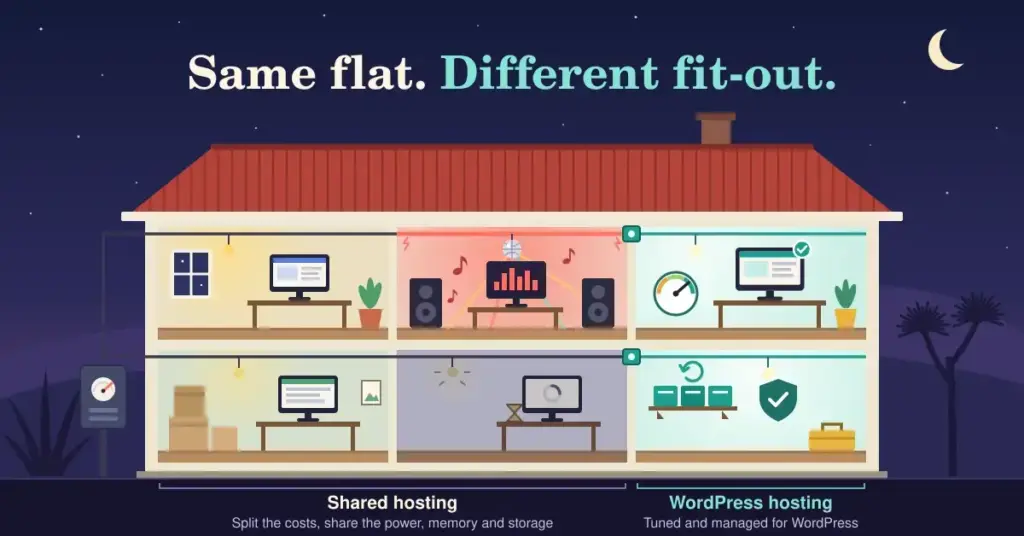
If you are setting up a website in New Zealand, one of the first choices you will face is the type of hosting to buy. Two names come up again and again: “shared hosting” and “WordPress hosting”. They sound like competing products, but they are not quite opposites — and picking the wrong one can leave you paying for features you do not need, or fighting a slow site you cannot fix.
This guide explains what each type really is, where they differ, what they cost in New Zealand in 2026, and how to decide. No jargon, no upselling.
What shared hosting actually means
Shared hosting is the entry level of the web hosting world. Your website lives on a single physical server alongside dozens or hundreds of other websites, and everyone shares the same pool of resources — processor, memory, and storage.
Think of it like renting a room in a large flat. It is affordable because the costs are split many ways, and for a small site that suits plenty of people. The trade-off is that you share the “utilities”. If another site on the same server has a sudden traffic spike or runs inefficient code, your site can slow down too. You also get limited control over the server’s settings.
Shared hosting is general-purpose. It will happily run WordPress, but it is not built specifically for it — the same plan is designed to run all sorts of software.
What WordPress hosting actually means
WordPress hosting is a server environment tuned specifically to run WordPress well. Because roughly 43% of all websites run on WordPress, many hosts now optimise for it: pre-installed WordPress, caching configured for the platform, and support staff who know WordPress rather than generic hosting.
It is worth clearing up a common confusion. “WordPress hosting” is a category, not a single tier. At the budget end, it can simply be shared hosting with WordPress optimisations bolted on. At the premium end sits managed WordPress hosting.
Not exactly. Managed WordPress hosting is the hands-off version: the host takes care of the technical upkeep for you — automatic core and plugin updates, daily backups, security monitoring, and server-side caching. You focus on your content; they keep the engine running.
So the honest comparison is not really “shared vs WordPress”. It is a spectrum: plain shared hosting at one end, WordPress-optimised shared hosting in the middle, and fully managed WordPress hosting at the top. For a fuller picture of the managed end, see our guide to managed WordPress hosting in NZ.
The differences that actually matter
Here is how the two approaches compare on the things you will feel day to day.
Shared hosting vs WordPress hosting at a glance
| What matters | Shared hosting | WordPress / managed hosting |
|---|---|---|
| Built for | Any website, general purpose | Tuned specifically for WordPress |
| Speed out of the box | Good, but more tuning is on you | Caching & modern PHP pre-configured |
| Updates & backups | Your responsibility | Handled for you (on managed plans) |
| Support know-how | Generic hosting support | WordPress specialists |
| Typical NZ cost / month | ~NZ$5–$35 | ~NZ$35–$105 (managed) |
| Best for | Blogs, portfolios, small sites | Stores, business & high-traffic sites |
Costs are rough 2026 guide bands and vary by provider; confirm current pricing before you buy.
A WordPress-tuned host usually ships with caching, modern PHP, and storage configured for a database-driven site, so pages tend to load faster out of the box. On plain shared hosting you can often get good speed too, but more of the tuning is on you.
Speed is not just about impatience. Google measures real-world loading with Core Web Vitals — targets of under 2.5 seconds for Largest Contentful Paint, under 200 milliseconds for Interaction to Next Paint, and under 0.1 for layout shift. A faster host makes those targets easier to hit.
This is where managed WordPress hosting earns its keep. WordPress runs the latest version best — WordPress 7.0 arrived in May 2026 and expects PHP 8.3 or newer, MySQL 8.0+ (or MariaDB 10.6+), and HTTPS on every install. A managed host keeps those components current and patches WordPress for you. On plain shared hosting, staying current is your responsibility, and an out-of-date plugin is one of the most common ways a site gets hacked. If security is a priority, our WordPress security best practices guide is worth a read.
Generic shared hosting support can help with the server, but may shrug at a WordPress-specific problem. WordPress-focused hosts employ people who know the platform, which saves hours when something breaks mid-launch.
What it costs in New Zealand
Prices move around and vary by provider, so treat these as rough 2026 guide bands rather than quotes:
Shared hosting from New Zealand providers typically runs about NZ$5 to NZ$35 per month, with budget international plans cheaper still on long contracts. Managed WordPress hosting generally sits around NZ$35 to NZ$105 per month, reflecting the updates, backups, and support bundled in. A .nz or .co.nz domain adds roughly NZ$20 to NZ$40 a year, and a decent SSL certificate should be free via Let’s Encrypt on any reputable plan.
Watch for introductory pricing that jumps sharply on renewal — a common trap at the budget end. For a deeper look at getting value without overpaying, see our guide to cheap WordPress hosting in NZ.
Does the server’s location matter for SEO?
You will often read that hosting on a New Zealand server gives your site a direct ranking boost in local search. That is overstated. Google does not hand out rankings simply because your server has a local IP address.
What is true is that a server closer to your visitors responds faster, and speed — through Core Web Vitals — is a genuine ranking factor. So local hosting helps your NZ audience indirectly, by improving the experience, not because a New Zealand IP is a magic switch. A site on an Auckland server and a well-configured site behind a content delivery network can both perform brilliantly for Kiwi visitors.
Which one should you choose?
The decision usually comes down to how much technical upkeep you want to handle yourself.
You are launching a personal blog, portfolio, or small brochure site, you are comfortable running your own updates and backups, and budget is the priority. It is a sensible, low-cost starting point, and you can upgrade later.
Your site matters to your income — an online store, a busy content site, or a business site you cannot afford to have go down. If you would rather not think about updates, security, and backups, paying for someone to handle them is usually money well spent.
Quick decision checklist
Lean shared hosting if you tick most of these
- It’s a blog, portfolio, or small brochure site
- Budget is the main concern
- You’re happy running your own updates
- Downtime wouldn’t cost you money
- Traffic is low and fairly steady
Lean managed WordPress if you tick most of these
- The site earns money (e.g. WooCommerce)
- You can’t afford it to go down
- You’d rather not manage updates yourself
- Security and backups matter to you
- Traffic is high or spikes often
Still unsure? Start on shared hosting and upgrade later — moving between hosts is routine, and most providers will migrate your site for you.
Whichever way you lean, you can always start small and move up. Migrating between hosts is routine, and most quality providers will handle the move for you. If you are ready to get going, our step-by-step WordPress install guide walks through the setup, and the main WordPress hosting NZ hub links to everything else you might need.
This article is general information to help you compare hosting types, not specific technical or purchasing advice. Prices, plans, and software requirements change often — always confirm the current details with the provider before you buy.
Reference sources
Frequently asked questions
Is WordPress hosting just shared hosting with a different name?
Not always. Some budget “WordPress hosting” is shared hosting with WordPress optimisations added. The bigger difference is with managed WordPress hosting, which also handles updates, backups, and security for you. Always check what a plan actually includes rather than going by the label.
Can I run a WordPress site on ordinary shared hosting?
Yes. WordPress runs fine on most shared hosting, provided the plan meets WordPress’s requirements — PHP 8.3 or newer, a MySQL 8.0+ or MariaDB 10.6+ database, and HTTPS. You just take on more of the maintenance yourself.
Is managed WordPress hosting worth the extra cost?
If your site earns money or you cannot afford downtime, usually yes. You are paying for automatic updates, backups, security monitoring, and expert support. For a hobby site on a tight budget, plain shared hosting is often enough to start with.
Will a New Zealand-based server improve my Google ranking?
Only indirectly. A local server responds faster to NZ visitors, and speed is a ranking factor through Core Web Vitals. But a local IP address on its own is not a direct ranking boost — good performance matters more than server location alone.
How much should I budget for hosting in NZ?
As a rough guide in 2026, expect around NZ$5 to NZ$35 a month for shared hosting and NZ$35 to NZ$105 a month for managed WordPress hosting, plus roughly NZ$20 to NZ$40 a year for a .nz domain. Watch for renewal prices that rise after an introductory period.
Can I switch from shared hosting to WordPress hosting later?
Yes, and it is common. Many people start on shared hosting and upgrade as their site grows. Migrating is routine, and most reputable hosts offer to move your site for you, often at no charge.
Do I still need to back up my site on managed hosting?
Managed plans usually include automatic backups, but keeping your own independent copy is still wise. Relying on a single backup location — even a good one — is a risk, so an off-site copy gives you extra peace of mind.